
TL;DR
- Birch is Revealbot renamed, and its pricing is what Revealbot alternatives compete on. Rules start on Pro at 99/month for up to 10K in combined monthly ad spend, and the price climbs with spend: 499 at 75K, 1,299 at 300K (bir.ch/pricing, checked November 15, 2026).
- Birch counts spend across every connected ad account. Go over your tier and Birch adds a Stripe overage fee.
- Bulk launch from Drive (Stage) is billed separately by uploads: 50 free, then $500/month for 900 uploads.
- Scalemate starts free (1 ad account, 1 rule, 30 launches/month, no card) and prices by ad account, not spend: Solo $149 (1 account, unlimited launches), Growth $349 (3), Team $499 (5) (scalemate.co/pricing, checked November 15, 2026).
- For one small account, Birch is usually cheaper. In our scenarios, per-account pricing pulls ahead once combined spend passes about 75K. All prices are list, monthly, excluding tax.
Why media buyers look for a Revealbot alternative
Birch (bir.ch), also spelled Bïrch, is the ad-automation platform formerly called Revealbot: condition-based rules for Meta, Google, TikTok and Snapchat, plus Stage for launching ads from Google Drive. Most people searching for Revealbot alternatives already know the rules engine works. What pushes them out is the bill.
"Because we spend $500k plus total monthly on ads we then get hit with a $516.30 bill AFTER CANCELLING," a Trustpilot reviewer wrote in a 1-star review on November 20, 2025 (Trustpilot). Another, in April 2025, put it shorter: "I think Bïrch is overpriced and not really worth it."
The bill that grows with your spend
Birch prices on your monthly ad spend across all connected accounts. When a campaign starts working and you scale it, your tool bill scales too. Paying more because your campaigns worked is a strange way to price software.
It's not only cost. A July 2025 reviewer described a launch that didn't go as planned: "I had to spend over four hours doing it manually myself." Those are two reviews out of 18 on a page with a 3.8 TrustScore (checked November 15, 2026), so treat them as signals, not a verdict.
What Birch (formerly Revealbot) does in 2026
A lot of comparison pages still describe Birch as "rules only." That's out of date. Per bir.ch/pricing (checked November 15, 2026), the product now includes:
- Rules: condition-based automation for Meta, Google, TikTok and Snapchat. This is the part most teams buy it for.
- Stage: creates ads from Google Drive media by duplicating your existing setups, on Meta, TikTok and Snapchat.
- Launcher: listed as a Pro feature, alongside a free version of Stage.
- Explorer: performance tracking, fatigue spotting and top-asset reports.
- Hub: server-side tracking for Meta, priced per event volume (free up to 10,000 events/month).
- Birch AI and Birch MCP: an AI layer plus a connector for your own AI tools. Routines are marked "Soon."
Birch also says it has "15,000+ clients" and publishes case studies, such as Loop Earplugs with "90 hours saved monthly." Those are Birch's own claims from its pricing page.
How Birch pricing works
Birch has three pricing tabs: Performance (the Essential and Pro plans), Hub, and Stage. The Performance price is set by one number: "monthly ad spend across all ad accounts you connect to Birch (Meta, Google, Snapchat, TikTok)."
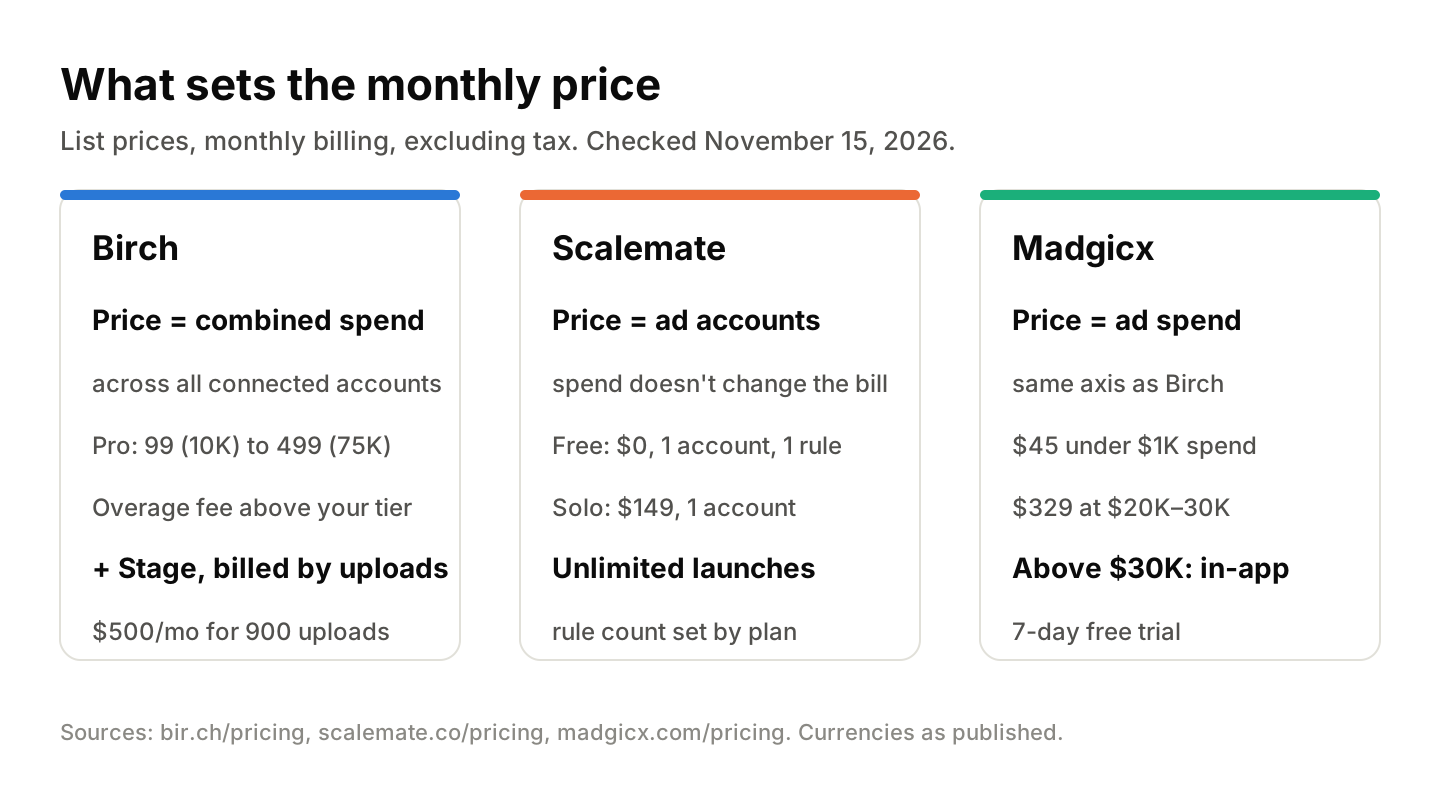
Spend-based, per-account, or both: the model sets your bill before any feature does.
The key details, all from Birch's pricing page and FAQ on November 15, 2026:
| Plan | Combined monthly ad spend | Price/month | What's included |
|---|---|---|---|
| Essential | Up to 10K | 49 (45 billed annually) | Workspaces, post boosting, reports, Slack. No automated rules |
| Pro | Up to 10K | 99 (91 billed annually) | Automated rules and strategies, Explorer, Launcher, Stage (free version) |
| Pro | Up to 30K | 249 | Same as Pro |
| Pro | Up to 75K | 499 | Same as Pro |
| Pro | Up to 150K | 799 | Same as Pro |
| Pro | Up to 300K | 1,299 | Same as Pro |
| Pro | Up to 500K | 1,799 | Same as Pro |
| Enterprise | Above 500K | Custom | — |
- Overages: if spend exceeds your plan's limit, Birch charges "additional fee issued by Stripe" and emails you.
- Stage: 50 uploads/month free; $500 for 900, $900 for 2,000, $1,400 for unlimited; up to 29% off annually. "Unlimited ad accounts on every plan."
- Trial and cancel: 14-day free trial with all features. When it ends, rules and reports are disabled until you pick a plan. Cancel any time; the subscription runs to the end of the billing cycle.
Currency matters here. Birch shows prices in euros or dollars depending on billing country and says the final price is "confirmed at checkout." The figures here are as published, not converted.
3 Revealbot alternatives, compared
These three cover the main ways to replace Birch: per-account pricing, spend-based pricing from another vendor, and the free native option. For a wider list, see our 13 Facebook ads automation tools compared.
Prices checked November 15, 2026. List prices, monthly billing, excluding tax, in each vendor's published currency.
| Tool | Pricing axis | Entry price with rules | Rules | Bulk launch | Platforms | Trial | Source |
|---|---|---|---|---|---|---|---|
| Birch Pro | Combined ad spend | 99/mo up to 10K spend | Included, no count shown | Launcher + Stage (free 50 uploads) | Meta, Google, TikTok, Snapchat | 14 days | bir.ch/pricing |
| Scalemate | Ad accounts | $0 (Free, 1 rule) | 1 to unlimited by plan | Unlimited from Solo ($149) | Meta, TikTok | Free plan; 7 days on Growth | scalemate.co/pricing |
| Madgicx Pro Complete | Ad spend | $45/mo under $1K spend | Automation included | Not on pricing page | Meta-led; TikTok in reports | 7 days | madgicx.com/pricing |
| Meta automated rules | None | Built into Ads Manager | Native | No | Meta only | n/a | Meta for Developers |
Scalemate: per-account pricing for Meta and TikTok
Scalemate prices by connected ad account, not ad spend. Spend $10K or $300K on one account and Solo stays $149/month. That plan includes 3 automation rules and unlimited ad launches. You can start on the Free plan with no card (scalemate.co/pricing, checked November 15, 2026).
| Plan | Price/month | Ad accounts | Rules | Launches/month | Extra account |
|---|---|---|---|---|---|
| Free | $0 | 1 | 1 | 30 | — |
| Lite | $34 | 1 | 1 | 200 | — |
| Solo | $149 | 1 | 3 | Unlimited | — |
| Growth | $349 (7-day trial) | 3 | 10 | Unlimited | +$99 |
| Team | $499 | 5 | 30 | Unlimited | +$89 |
| Scale | $999 | 10 | Unlimited | Unlimited | +$69 |
Prices are in USD, with tax added at checkout.
What you get: automation rules for Meta and TikTok and the ability to bulk launch hundreds of ad sets from one template, with creatives synced from Google Drive.
The rule builder goes past "pause if CPA > X":
- Custom conditions. Compare a metric to a number, to another metric (including over a different timeframe), to a multiple of a metric, or to a formula. Group conditions, and put several condition → action pairs in one rule.
- Your own data in rules (Meta). Connect BigQuery, write a SQL query, and Scalemate pulls the result on a schedule (every 15 minutes to once a day). The result becomes a metric your campaign, ad set and ad rules can check, so a rule can pause on backend margin or LTV instead of Meta-reported ROAS.
- Actions. Pause, activate, raise or cut budget by % or amount with a cap, set a budget, change bid strategy on ad sets, and duplicate a Meta campaign (ABO included).
- Schedules. Checks every 15 minutes up to every 5 hours, or a custom schedule by weekday. TikTok rules also take last-1-hour and last-3-hour windows and work down to creatives inside Smart+ ads.
- System user token. Connect Meta with a Business Manager system user token instead of a personal login.
- Alerts and dry runs. Slack and email alerts, digests, and a dry run that shows what a rule would change before it acts.
The limits: no Google Ads or Snapchat, and rule counts are capped below the Scale plan. If you need 20 rules on one low-spend account, Birch Pro is cheaper.
Madgicx: spend-tiered like Birch, from $45
Madgicx Pro Complete uses the same pricing axis as Birch. Prices per madgicx.com/pricing, checked November 15, 2026:
| Monthly ad spend | Price/month |
|---|---|
| Under $1K | $45 |
| $1K–2.5K | $99 |
| $2.5K–5K | $119 |
| $5K–10K | $129 |
| $10K–20K | $229 |
| $20K–30K | $329 |
| Above $30K | Shown in the app |
There's a 7-day free trial.
It's Meta-first. TikTok shows up on the pricing page as a source for its One-Click Report, not as an automation channel. Switching from Birch to Madgicx changes the vendor, not the pricing model. Our Madgicx review goes deeper.
Meta automated rules: the free baseline
Meta's own automated rules live inside Ads Manager, with no separate subscription. Under the hood it's Meta's Ad Rules Engine, which supports schedule-based rules (checked at a set interval) and trigger-based rules (checked in real time).
The catch: it's Meta only, rules are set per ad account, and there's no bulk launch or cross-platform view. For one account and a handful of pause or budget rules, it may be all you need. Once you add TikTok or a second account, the manual setup adds up.
What each tool costs at your spend
In our view, the pricing axis matters more than the feature list once you pass 3 accounts. So here's the maths. Each scenario uses the plan that meets the stated need, at list price, monthly billing, excluding tax, from the vendor pages above (checked November 15, 2026). Currencies are as published, not converted.
| Scenario | Birch Pro | Scalemate | Madgicx |
|---|---|---|---|
| A. Solo buyer: 1 Meta account, about $8K/month, 3 rules | 99 (up to 10K tier) | $149 (Solo) | $129 ($5K–10K) |
| B. In-house team: 3 accounts (Meta + TikTok), about $25K combined | 249 (up to 30K tier) | $349 (Growth) | $329 ($20K–30K) |
| C. Agency: 5 accounts, about $60K combined | 499 (up to 75K tier) | $499 (Team) | Price in app (above $30K) |
| D. Same agency at about $200K combined | 1,299 (up to 300K tier) | $499 (Team) | Price in app (above $30K) |
The formula: Birch Pro = the tier that contains your combined monthly spend. Scalemate = the plan that covers your account count and rule count, plus extra accounts if needed. If you also run high-volume Drive uploads through Birch's paid Stage, add its upload tier on top (for example $900/month for 2,000 uploads).
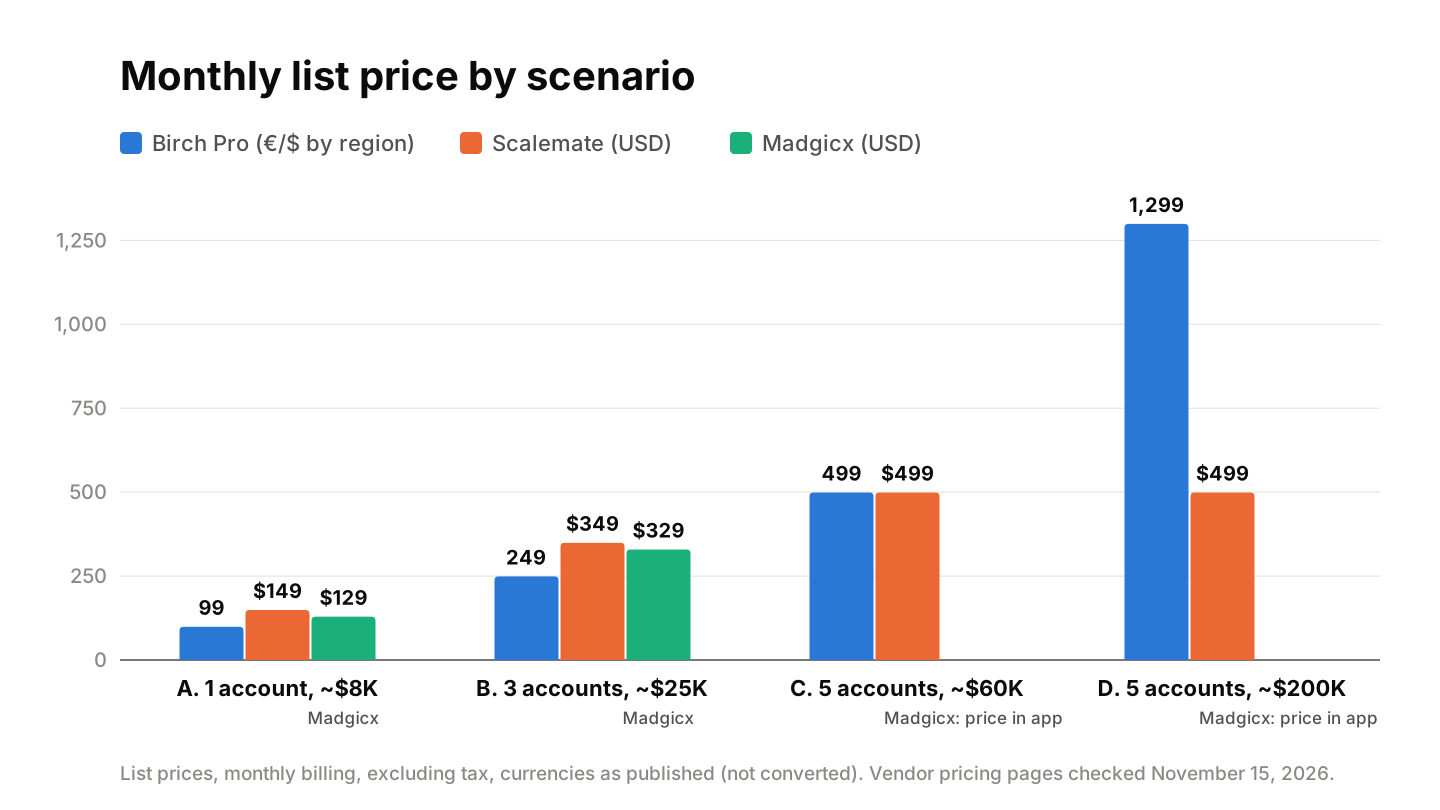
Birch is cheapest for small, single-account setups; per-account pricing wins once spend climbs.
Read it like this: at A and B, Birch Pro is the lowest list price. At C, Birch Pro and Scalemate Team are level. At D, Birch Pro costs more than twice Scalemate Team for the same five accounts, because spend went up and the account count didn't. Results vary by account setup, niche, and budget.
When Birch is still the better pick
For a lot of teams, staying on Birch is the right call.
- One account, low spend, many rules. Pro at 99 up to 10K spend includes automated rules with no rule count shown on the pricing page. Scalemate Solo gives you 3.
- You run Google Ads or Snapchat. Birch covers both. Scalemate doesn't.
- Your data lives in Google Sheets, AppsFlyer or Hyros. Birch connects to those directly. Scalemate pulls outside data only from BigQuery.
- You want a longer trial. Birch gives 14 days on everything. Scalemate's paid trial is 7 days on Growth (plus the Free plan).
Birch users who like it tend to mention reporting and alerts. One 5-star reviewer (October 2025) wrote: "We are using this tool for automated reports delivery in Slack and some alerts to Slack." Another (April 2025): "It helped us significantly reduce wasted ad spend while improving ROAS."
If your problem is launch volume rather than rules, compare dedicated bulk ad launch tools before deciding.
How to switch from Birch without breaking live campaigns
Rules that pause ads and move budgets are live controls. Switch them like you'd change a bid strategy: in steps, with a fallback.
- Inventory your rules. Export or list every active Birch rule: the condition, action, check frequency and which ad accounts it touches. Flag the 3–5 that protect budget (stop-loss, CPA caps, daily spend limits).
- Rebuild in the new tool. Start from ready-made rule templates and adjust thresholds to match your Birch setup.
- Run both in parallel, notify-only. Set the new rules to alert instead of act for about a week. Compare which ads each tool would have paused or scaled.
- Cut over. Switch the new rules to live actions, then turn off the matching Birch rules the same day. Don't leave both acting on one ad set.
- Cancel at the right time. Birch subscriptions run to the end of the billing cycle, so cancel after cutover, not before. If you're still on a Birch trial, remember rules switch off when it expires.
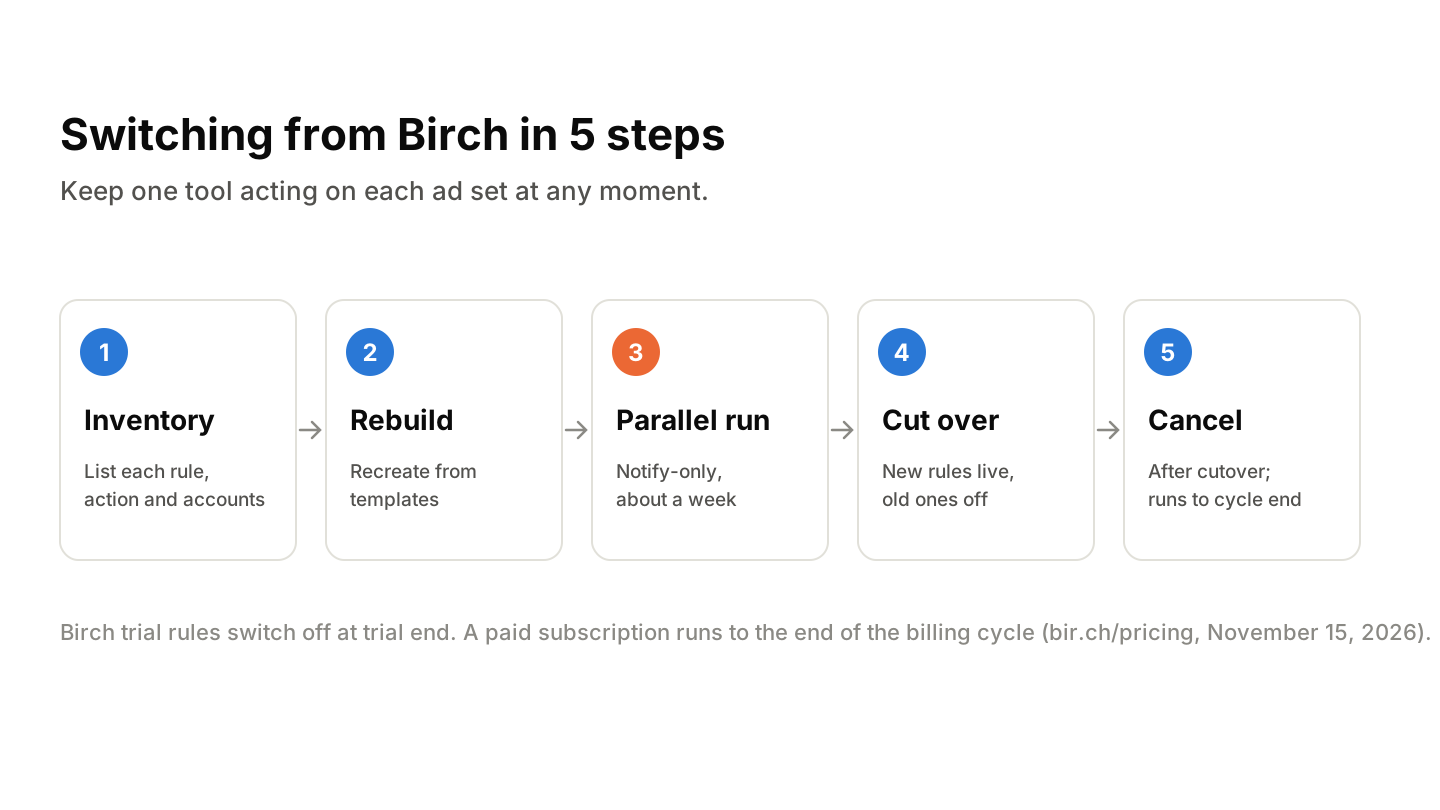
Run both tools in notify-only mode for a week before you cut over.
One thing to watch: Birch's overage is calculated on spend. A Trustpilot reviewer in December 2023 complained about "a very expensive extra fee for my spending done OUT of the platform." Before you cancel, check your billing page for pending overage charges so the last invoice doesn't surprise you.
Pick the pricing model first, then the tool
If your spend is small and stable, Birch Pro is hard to beat on price. If you're scaling spend across several Meta and TikTok accounts, a per-account plan keeps the tool bill flat while the campaigns grow. Compare our per-ad-account plans, or start on the free tier: 1 ad account, 1 rule, 30 launches a month, no card.