Madgicx is a solid Meta optimization tool. AI audiences, creative scoring, automation rules, cross-channel reporting, all in one dashboard on top of Ads Manager. For e-commerce teams running Meta ads, it handles the "what should we run" side well.
But once your team starts scaling, the picture shifts. Creatives burn out faster than your team finds new winners. Your campaigns run across Meta and TikTok, not just one platform. Your ad spend is primarily on mobile apps. And you need API access to plug ad operations into your existing BI and internal tools rather than switching to another closed platform.
Madgicx doesn't cover that. It's built for web-based Meta optimization, not multi-platform ad operations at scale.
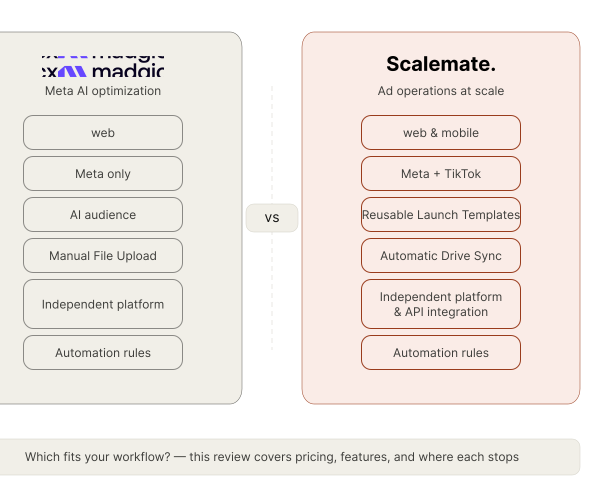
This Madgicx review covers where it works, where it stops, what it costs, and what to look at when you need operational infrastructure instead of optimization intelligence.
Based on hands-on platform analysis and 50+ verified user reviews from G2, Capterra, and TrustRadius.
Bottom line: Madgicx focuses on AI Meta ads optimization: audience discovery, creative scoring, and reporting. Scalemate focuses on automation of ad operations at scale: bulk ads launches, creative delivery from cloud storage, and multi-platform campaign management. This review helps you figure out which one fits your workflow.
What Is Madgicx?
An AI-powered Meta ads platform. Audience targeting, creative analysis, automated optimization, reporting, all in one dashboard. Sits on top of Ads Manager and helps you decide what to run, what to pause, where to shift budget.
On the market since ~2018. Positions itself as an "Agentic AI Ads Manager." Core audience: e-commerce and DTC brands on Meta. Agencies and affiliate marketers use it too.
Honest take: the positioning is accurate. It's an optimization brain bolted onto Meta Ads Manager, not an operations layer. That distinction matters once you're past the "what to run" question and into "how do we ship this every week."
G2 verdict (50+ verified reviews): Strong AI audiences and creative scoring on Meta, weak on cross-platform — campaign management is Meta-only despite cross-channel reporting in the dashboard. Read Madgicx G2 reviews →
Madgicx Features — What Actually Works
A fair Madgicx review starts with what actually works.
AI Audiences. 100+ pre-built audiences: eRFM segments, Super Lookalikes blended up to 20%. Useful for finding audience pockets you wouldn't test manually. Does the segmentation work in hours, not days.
Creative Intelligence. AI tags visual elements and shows what drives performance. Creative Matrix maps spend vs revenue across all creatives. Creative Clusters auto-combine top copy with top visuals. You see what's working, fast.
Automation Rules. Custom rules with AND/OR logic. Conditions on ROAS, spend, conversions, then actions: pause, adjust budgets, set bid caps, optimize by age/gender/location/placement/device, duplicate assets. Pre-built tactics (Surf, Sunsetting) for quick setup. As a facebook ads automation tool, Meta only.
Audience Launcher + Ad Launcher. Two tools that work together. Audience Launcher creates new campaigns with new ad sets and audiences. Ad Launcher pushes ads into existing ad sets. Creatives must be uploaded to Madgicx first; no direct sync from cloud storage.
AI Ad Generator. Creates image ads and copy variations from existing ads, product pages, or competitor creatives. Sparkle design service: custom creatives in 48 hours.
Cross-Channel Reporting. Data from Meta, Google, TikTok, GA4, Shopify, Klaviyo, all consolidated. White-label reports, shareable links. One of the platform's strongest areas.
Madgicx Pricing
Single plan called "Madgicx Pro Complete with AI." Price scales with ad spend:
| Monthly Ad Spend | Monthly | Quarterly | Annual |
|---|---|---|---|
| Up to $2,500 | $99 | $84 | $69 |
| $2,500–$5,000 | $119 | $101 | $83 |
| $5,000–$10,000 | $129 | $110 | $90 |
| $10,000–$20,000 | $229 | $195 | $160 |
| $20,000–$30,000 | $329 | $280 | $230 |
| $30,000+ | Custom | Custom | Custom |
| Free trial | 7 days, full access |
Source: madgicx.com/pricing
Add-ons: Tracking Pro (server-side, CAPI) at $49/mo per ad account. Extra ad accounts at $9/mo each.
At $5–20K/mo spend, Madgicx pricing makes sense. AI audiences, creative scoring, automation, reporting, all included. At higher spend with multiple accounts, costs stack up and the value stays limited to Meta. Scalemate pricing is structured around operational volume, not ad spend (details here).
What this actually means: if Meta is 80%+ of your spend and you live inside Ads Manager, the price tracks with the work it saves. If Meta is half your spend or less, you're paying optimization rates for a tool that only optimizes one channel.
Madgicx Pros and Cons
Every Madgicx review worth reading should present both sides. Based on Madgicx reviews from G2, Capterra, and TrustRadius:
Pros:
- Strong AI for audience discovery on Meta
- Creative intelligence shows which elements actually perform
- Wide automation rule actions across budget, targeting, placements, devices
- Cross-channel reporting in one dashboard
- Ad Launcher for bulk Meta ad creation
- AI-generated ads and copy variations
"The AI audiences saved us hours of manual targeting work. We found profitable segments we wouldn't have tested on our own." (G2 verified review)
Cons:
- Campaign management = Meta only. Google, TikTok, Snap are reporting only
- Rules occasionally misfire without warning (G2 reviews)
- Creatives must be uploaded manually to their system. No Google Drive or cloud sync
- Pricing scales with spend, so higher tiers get expensive fast
- Cloud Tracking built for web/Shopify. No Adjust, AppsFlyer, or MMP integrations
- Audience Launcher caps audience count per launch (verified via Madgicx support, April 2026). No reusable templates or multi-language/GEO matrix
- AI Bidding offers limited manual control. If your team already has specific optimization approaches, the AI overrides them. Users report it applies the same bids regardless of ad set or performance history (G2 reviews)
Where Madgicx Stops
Understanding where a tool stops is as important as knowing what it does. Here's where Madgicx's scope ends, and why teams start looking for a Madgicx alternative.
Execution at scale. Madgicx splits campaign launches into two separate tools. Audience Launcher creates new audiences and ad sets. Ad Launcher pushes creatives into existing ad sets, but can't create new ones. So to launch a full campaign from scratch, you go through two tools in sequence. There's no way to save the whole setup as a template for next time, and audience or GEO configurations can't be set up in bulk. For teams that launch often with repeating structures, the setup stays manual every time.
Madgicx TikTok Automation: Reporting Only, Not Campaign Management
Madgicx TikTok ads automation is limited to reporting. TikTok campaign data shows in cross-channel dashboards, but you cannot create TikTok ad sets, run automation rules on TikTok campaigns, or adjust TikTok budgets from Madgicx. Campaign management is Meta-only.
For teams running parallel Meta + TikTok funnels — the typical mobile UA, eCommerce, and lead-gen setup in 2026 — this means Madgicx covers half your workflow. You still need a separate tool (or Ads Manager) to launch, optimize, and pause TikTok creatives. The same applies to Snapchat and Google Ads in Madgicx — reporting works, campaign management doesn't.
If TikTok automation is a hard requirement, Madgicx alternatives that manage both Meta and TikTok campaigns from one interface include Scalemate (rules engine + bulk launches for both) and bir.ch (formerly Revealbot — rules only, no bulk).
The creative pipeline. Your design team puts 50 new assets in Google Drive. Somebody still downloads them, uploads to Madgicx Creative Studio, assigns to campaigns, launches. Every week. As of April 2026, confirmed via Madgicx support chat: "files need to be in our system first, not pulled directly from Google Drive."
AI Bidding control. Madgicx AI Bidding manages bids automatically, but doesn't give you control over bid strategy per ad set. If your team already has tested optimization approaches, the AI overrides them. Users report it applies the same bids regardless of ad set or performance history.
Mobile app teams. Cloud Tracking is built for web (Shopify, server-side CAPI). If your attribution runs through Adjust or AppsFlyer, there's no integration. Different tracking architecture.
These aren't bugs. They're scope boundaries. Teams looking for tools like Madgicx but with operational focus end up searching for a Madgicx alternative.
Madgicx vs Scalemate — Quick Comparison
Madgicx is built for Meta-only optimization on web; Scalemate is built for ad operations at scale across Meta and TikTok with reusable templates, Drive sync, and open API.
Worth knowing: these tools live in different layers of the workflow, not different positions on the same axis. Comparing them feature-for-feature only matters if you've already decided whether the bottleneck is "what to run" or "how to ship it." Based on team usage as of April 2026, our internal Drive sync flow moves a 50-asset weekly batch from Drive into live campaigns in under a minute, versus the manual download-rename-upload cycle into Madgicx Creative Studio that the same team measured at 35–45 minutes. Different jobs, different math.
| Madgicx | Scalemate | |
|---|---|---|
| Focus | Meta ads optimization (audiences, creatives, reporting) | Ad ops automation (bulk launches, campaign auto-optimization) |
| Bulk launch | Two separate tools (Audience Launcher + Ad Launcher), no saved templates, Meta only | One flow with reusable templates, any structure, Meta + TikTok |
| Campaign structure | Within Madgicx UI | Fully customizable via reusable templates |
| Creative upload | Manual upload to Creative Studio | Google Drive sync (auto, no duplicates) |
| Automation rules | Custom + pre-built, wide range of actions, Meta only | Custom, multi-action rules, Meta only |
| Analytics | Cross-channel dashboard (Meta, Google, TikTok, GA4, Shopify, Klaviyo) | BI integration + AI Chat (analysis and bulk actions) |
| API | Closed (Shopify, GA, Facebook) | Open API with documentation |
| Platforms (management) | Meta only | Meta + TikTok, others on request |
| Creative AI | AI generation + scoring | No |
| AI Audiences | 100+ pre-built | No |
How Scalemate Approaches It Differently
Scalemate doesn't do AI audiences. Doesn't score creatives. Doesn't build reporting dashboards. Not the job.
It automates the part between "we know what to run" and "it's live across all markets." The operational layer.
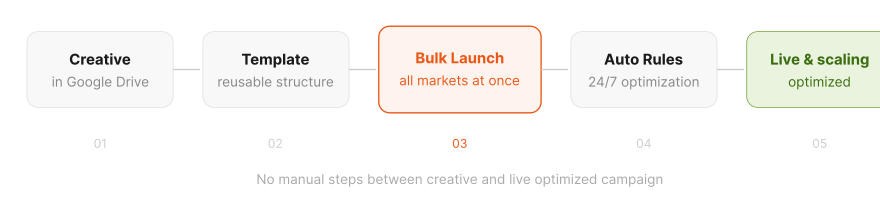
No manual steps between creative and live optimized campaign.
Bulk ad launch. Upload creatives to Google Drive, pick a saved template with the campaign structure you need, and launch ads in any combination of creatives, audiences, and placements at once. Templates are reusable: set up once, launch again next week without rebuilding anything. Once ads are live, automation rules take over: pause what underperforms, scale what works. The full cycle from creative to live ad to optimized campaign runs without manual steps in between.
Drive sync. Connect a Google Drive folder. New assets sync automatically, with no duplicates and no re-uploading. Creatives go straight to your library or directly into campaigns. The download-upload-rename cycle? Gone. Teams can start with the free bulk ad creative uploader to test the workflow.
Automation rules. Set performance thresholds once: ROAS floor, CPI cap, spend limit. Rules run 24/7 and auto-pause underperformers, scale winners, or adjust bids without manual checks. Built-in rollback reverses scaling if performance drops after a budget increase. Budget protection that works anytime, not just during office hours. For ready-to-copy rule templates by goal, browse the automation rules library.
Open API. Documented, ready to connect. Launch ads from your creative library in Airtable. Trigger campaigns from internal analytics. Build workflows around how your team already operates, not around someone else's UI.
AI Chat. Ask about metric changes. Validate a hypothesis before acting on it. Pause underperformers or scale what's working in bulk, through chat. Faster than digging through Ads Manager tabs yourself.
Adjust integration. MMP data for mobile attribution. Other MMPs on request. If your team runs app campaigns, attribution data works the way mobile campaigns are actually measured.
Meta + TikTok. Campaign management on both. Other platforms on request. For teams where paid social stopped being Meta-only a while ago.
The trade-off is real: no AI-driven audience discovery, no creative generation, no reporting dashboards. If you need an AI to guide optimization decisions on Meta, Madgicx does that, and does it well.
See how teams build launch templates for any campaign structure: Scalemate for media buyers →
Which Tool Fits?
In our experience working with multi-platform teams, the bottleneck almost always shifts from optimization to operations once volumes cross a few thousand creatives a month. Pick the tool that solves the bottleneck you actually have, not the one that sounds adjacent to it.
Madgicx when:
- You run Meta ads for e-commerce/DTC at $5–50K/mo
- The bottleneck is knowing what to optimize: audiences, creatives, budgets
- You need Shopify, GA4, Klaviyo reporting in one place
- Looking for prebuilt AI audiences and AI creatives
- Attribution is web pixel or server-side
Scalemate when:
- The bottleneck is launching, uploading, structuring campaigns across markets
- You test multiple concepts × languages × GEOs regularly
- Creatives come from a design team via Drive and need to hit ad platforms fast
- You manage campaigns on Meta and TikTok
- You need API access to plug ad operations into your existing tools
- Attribution runs through Adjust or another MMP
- Campaign structures are custom and they change
Both together: Madgicx for optimization intelligence on Meta. Scalemate for execution across platforms. No overlap.