TL;DR
- Placement asset customization on Meta needs 4 ratios to cover every placement: 9:16, 4:5, 1:1 and 1.91:1.
- A 1:1 image is rejected on Facebook Search and Right column, even though public guides recommend it there. Those placements need 1.91:1 (first-party: validated on real launches, documented in Scalemate's launcher code, checked November 24, 2026).
- The last rule in a placement-customized ad has no placements. It is the default rule, and its file (usually 1:1) serves every position the other rules skip.
- In the API, every placement-customized ad needs more than one customization rule (Meta Marketing API, checked November 24, 2026).
- In bulk, Scalemate groups up to 100 files per batch into one multi-placement ad per concept.
"Are you still exporting both 9:16 and 4:5 versions of the same ad? Or are you uploading one file and letting Meta adapt it for every placement?" That's how one media buyer put it on r/FacebookAds in November 2026. Placement asset customization is the Meta Ads feature that answers it: one ad, several files, and each placement gets the file in the ratio it needs. Meta's own definition is short: use it "to customize the creative assets displayed in different ad placements" (Meta Marketing API).
The feature is simple. The ratio rules behind it aren't, and the published "recommended ratio" tables don't match what Meta actually lets through. Below is the map that delivers, split by image and video, plus a way to apply it to a whole batch instead of one ad at a time.
What placement asset customization is
Placement asset customization (PAC) lets one Meta ad carry several versions of the same creative and assigns each version to a group of placements. A 9:16 file goes to Stories, a 4:5 file to Feed, a 1.91:1 file to Search. The ad keeps one ID and one set of results, so you compare concepts, not crops.
Newer Ads Manager screens call the same idea media customization. Whatever the name, the job is the same: stop Meta from stretching or cropping one file across surfaces it wasn't made for.
What you can change per placement
The main thing you swap per placement is the media: an image, a video or a carousel, in the ratio that placement wants. Meta's API reference lists headlines and body text as assets you can supply too, with one documented exception: "the link description cannot be customized per placement" (Meta Marketing API, updated June 28, 2026).
In practice, media is where the work is. Copy usually stays the same; the file is what breaks in Stories when a feed crop gets stretched to full screen.
The Ads Manager workflow changed in 2026
Buyers noticed the change before most guides did. In April 2026 one wrote that "the latest Ads Manager update seems to have removed the straightforward option to upload different files for Feed (1,080 x 1,350) and ..." (r/FacebookAds). The per-placement option didn't disappear. It moved into the media customization flow, where you add several files to one ad and set which placements each one serves.
For the click path in your own account, Meta's placement asset customization help page is the reference. The ratio question is where it gets harder.
Which ratio Meta accepts per placement
Here's the part we care about most. Public ratio tables tell you what Meta recommends. What matters at launch is what Meta accepts, and the two differ in three places. The map below is the one Scalemate's campaign launcher ships. Each row was validated on real launches against Meta's live checks, and the results are documented in the launcher code (first-party, checked November 24, 2026).
| Placement group | Image | Video |
|---|---|---|
| Stories & Reels | 9:16 for Stories and Reels, in one rule | 9:16 for Stories, Reels and Audience Network rewarded video |
| Feed & Marketplace | 4:5 for Facebook and Instagram feeds, profile feeds, Marketplace (no video feeds) | 4:5 for feeds, video feeds, profile feeds, Instagram Explore |
| Search & Right column | 1.91:1 only | Horizontal (16:9 or 1.91:1), also Marketplace and in-stream |
| Everywhere else | 1:1, default rule | 1:1, default rule |
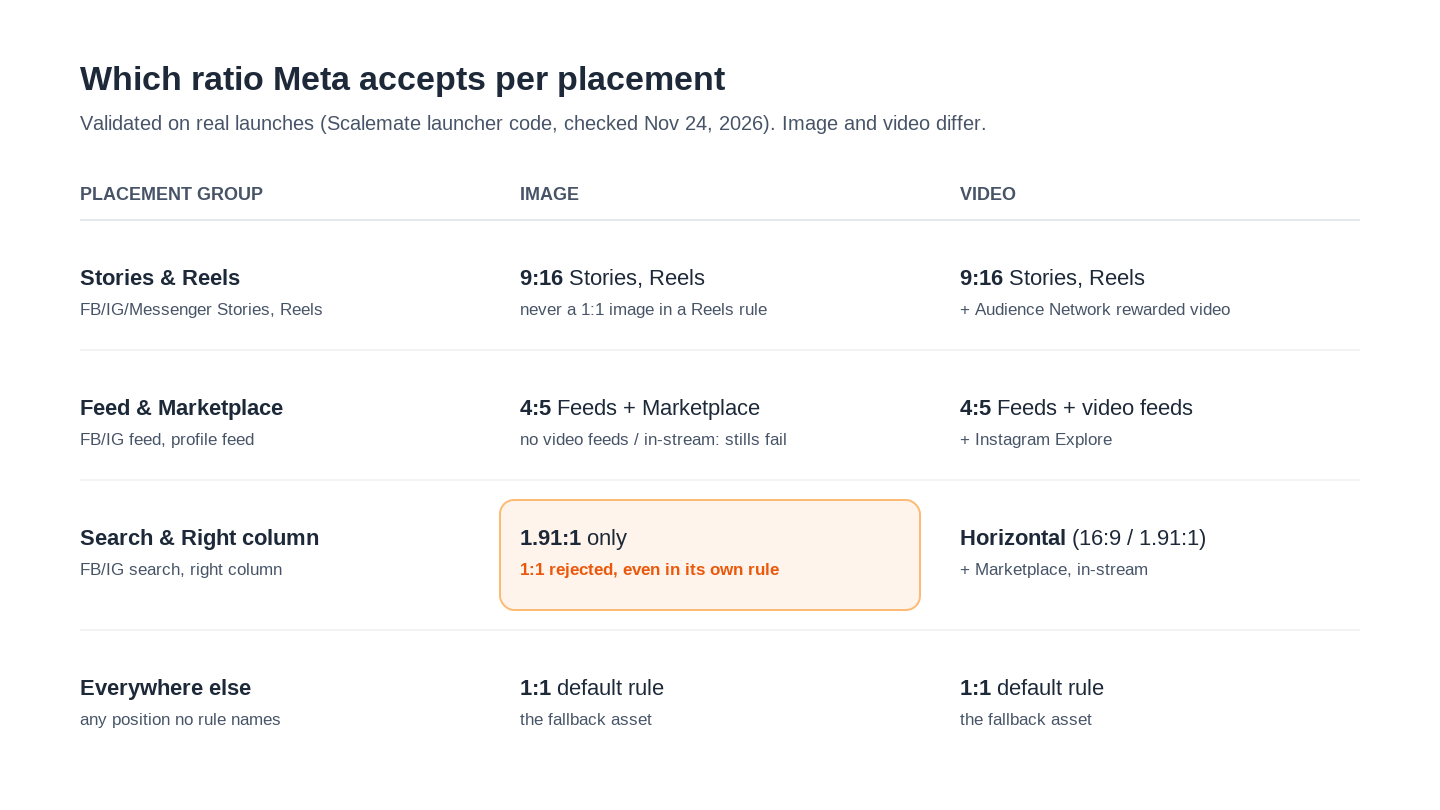
Recommended isn't accepted. Search wants 1.91:1, not 1:1.
If you only remember one row, make it the third. The generic "facebook ad image size" advice everyone repeats doesn't split image from video, and that split is where launches fail.
Why 1:1 fails on Search and Right column
Jon Loomer's placement guide, last updated March 6, 2025, reads Meta's own recommendation for Right column as "1:1 for both videos and images" (Jon Loomer Digital). In our launches, that's not what the validator wants.
We isolated it: a 1:1 image in a rule of its own for Search, Marketplace and Right column was rejected as undeliverable. The requirement is a real 1.91:1 file, for example 1200×628 (first-party: validated on real launches, documented in Scalemate's launcher code, checked November 24, 2026). The square preview tiles you see in Ads Manager just center-crop that horizontal file. That's a display quirk, not a sign the square file would pass.
Images vs video: Reels and in-stream behave differently
Two image-only traps showed up on real launches (first-party: validated on real launches, documented in Scalemate's launcher code, checked November 24, 2026):
- Reels. A 1:1 image in a rule that named the Facebook or Instagram Reels positions came back "Ad Undeliverable to Facebook/Instagram Reels". The same 1:1 image delivered fine through the default rule. A 9:16 image in one rule with Stories passed and rendered full-screen, so put Reels next to Stories, not next to the square file.
- Video feeds and in-stream. Facebook video feeds and in-stream are video surfaces. A still image assigned there triggered "Ad undeliverable to Facebook Feed". Keep them in your video rules only.
Video is the easier side. A 9:16 video covers Stories and Reels, 4:5 covers the feeds, and a horizontal cut covers Search, Marketplace and in-stream.
Why the per-ad setup breaks at volume
Per-placement assets in Ads Manager are set ad by ad. Ten concepts in three ratios means 30 files to assign by hand, then a preview check on every placement of every ad.
That's why some buyers give up on the native flow. One agency buyer wrote: "On my clients accounts, I stopped grouping entirely and now upload every placement version separately with asset customization forced per ..." (r/FacebookAds, August 2026). Uploading each ratio as its own ad works, but it splits one concept's results across several ads.
The pressure to ship more formats isn't going away either. We break down Andromeda's push for creative diversity separately, and our take is simple: more formats per concept is the right move. Doing it by hand for every ad is the part worth cutting, and it's the core problem in launching ads at scale.
How to launch placement-customized ads in bulk
The manual flow works one ad at a time. The bulk version turns a folder of exports into one multi-placement ad per concept. Here's how it runs in Scalemate's Quick Launch, which handles bulk ad creation for Meta. If you're still picking a tool, our roundup of bulk upload options for Meta and TikTok covers the wider set.
- Export each concept in every ratio with the same base name.
summer-sale-story.jpg,summer-sale-feed.jpg,summer-sale-square.jpg,summer-sale-banner.jpg. Words like story, feed, square and size tokens like1080x1350are ignored when matching, sosummer-saleis the concept. - Upload the batch. The ratio is read from each file's real pixel dimensions, never from its name. No renaming to
_9x16or_4x5needed. - Click "Group to multi-format". Files with the same base name become one group. Up to 100 files go through grouping per batch.
- Check the groups. Each group holds one media type (images and videos never mix) and one file per ratio. If two files land in the same ratio, the one closest to the exact ratio wins. A group needs files in at least two ratios, or its files stay single ads.
- Review the placement editor. It shows four surfaces: Stories & Reels, Feed & Marketplace, Search & Right column, and Everywhere else.
- Launch, then preview each placement in Ads Manager before you scale spend.
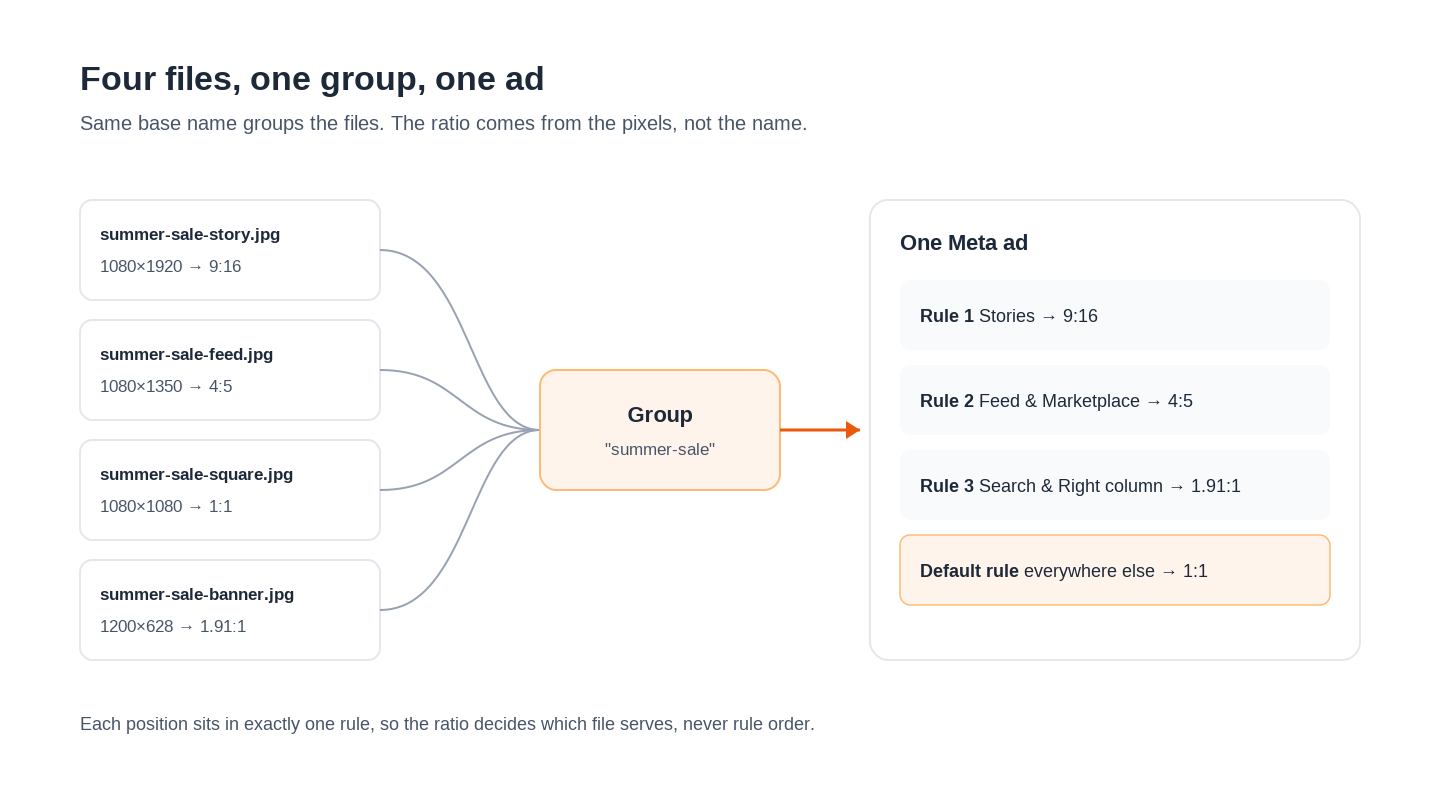
Same base name in, one ad out. The pixels pick the placement.
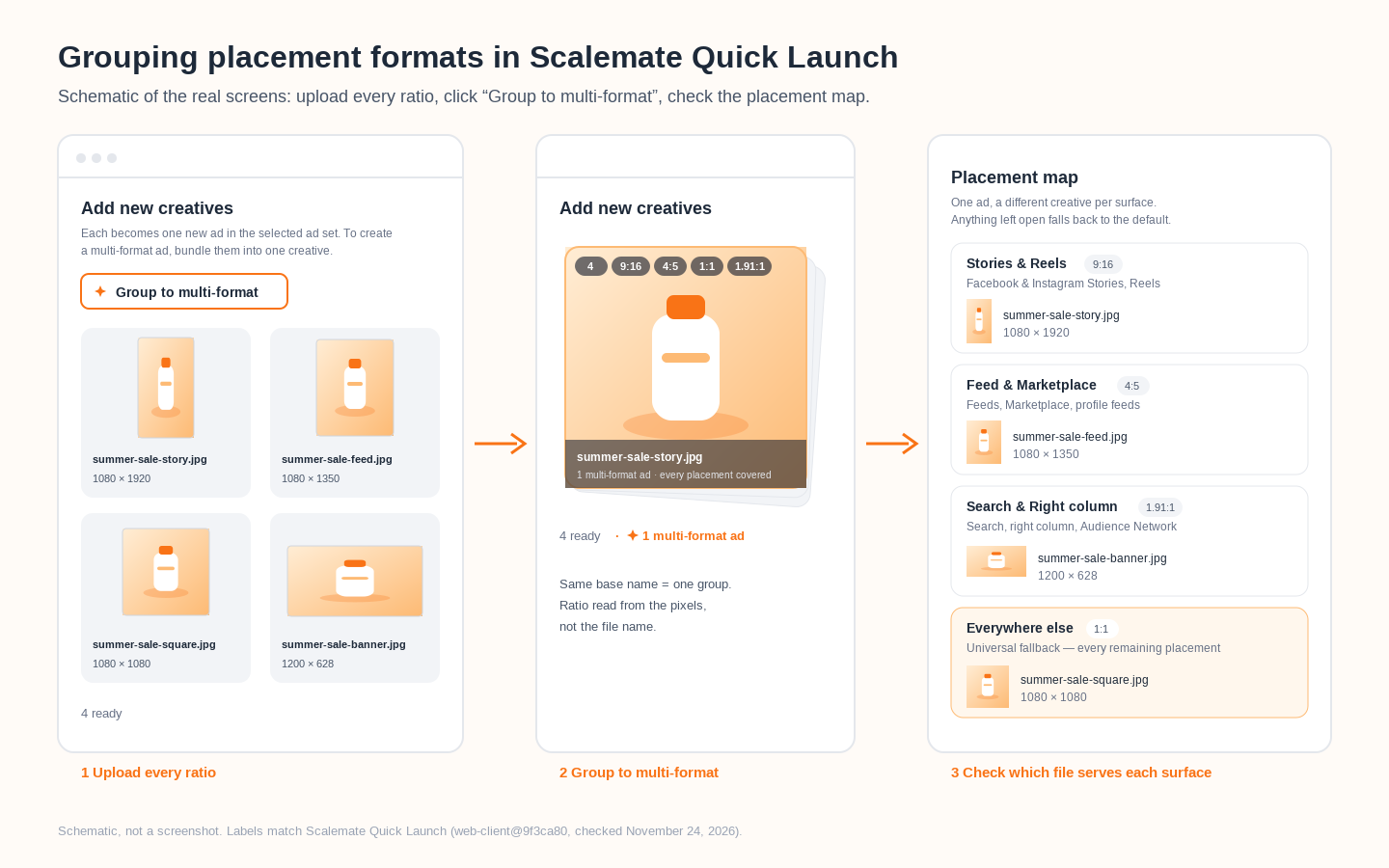
What the three steps look like in Quick Launch: upload, group, then check the placement map before launch.
The ratio buckets are fixed by width divided by height: up to 0.7 counts as 9:16, up to 0.9 as 4:5, up to 1.2 as 1:1, and anything wider as 1.91:1. A 1080×1350 file (0.8) lands in 4:5; a 1200×628 file (1.91) lands in 1.91:1.
What happens under the hood
Each group becomes one Meta ad built with asset_feed_spec and asset_customization_rules, optimized by placement. Three things make it deliver cleanly:
- Every position sits in exactly one rule. If two rules named the same position, rule priority, not ratio, would decide which file serves it.
- The last rule is the default rule. It names no placements and catches everything else. The 1:1 file takes it when there is one. Without a 1:1, the order is 9:16, then 4:5, then 1.91:1. So a group with only 4:5 and 9:16 files makes the 9:16 the default and spends its explicit rule on the feeds.
- Instagram rules depend on the account. If the ad has no connected Instagram account, rules naming Instagram positions are dropped. Otherwise Meta rejects the ad with "Instagram Account Is Missing".
Meta's reference requires more than one customization rule per asset_feed_spec (Meta Marketing API). A group always has two or more ratios, so it always ships with at least one explicit rule plus the default. The same placement editor is also in Scalemate's campaign builder, if you build ads one at a time.
Common pitfalls
Five setups to avoid:
- A 1:1 image as your only horizontal option. Search and Right column want 1.91:1 for images. Export a horizontal cut for every concept you want there.
- A 1:1 image in a Reels rule. That returned "Ad Undeliverable". Put Reels in the 9:16 rule with Stories, or leave Reels to the default rule.
- Stills in video-only positions. Facebook video feeds and in-stream take video only. An image assigned there fails.
- Two rules claiming one position. Then rule order picks the file, and Stories can end up with a feed crop. Keep the placement groups disjoint.
- Groups with one ratio. A concept exported only in 4:5 can't be customized. It launches as a regular ad.
On the API side, one more: Meta's reference says placement asset customization with existing posts is no longer supported via the API, only in Ads Manager (Meta Marketing API, checked November 24, 2026). If an API edit of a post-based ad fails, that's the first thing to check.
Who this fits (and who doesn't)
If you launch a handful of Meta ads a week, Ads Manager's own customization flow is enough. Set it up once per ad, check the previews, and use the ratio map above so nothing gets rejected.
If you launch 20 to 100 creatives at a time, the per-ad flow is the bottleneck. That's where grouping a batch into multi-placement ads pays off, and where it's worth comparing bulk ad launch tools side by side.
One limit: this is Meta only. TikTok has no equivalent in Scalemate's launcher, so the grouping button is hidden for TikTok batches.
Want the four-ratio setup without 30 trips through the same panel? Upload a batch to Scalemate's bulk launcher, group it to multi-format, and launch one ad per concept.