
One question keeps coming up for high-volume media buyers: how do you bulk upload 100+ weekly Facebook ads without building each one by hand? It keeps coming up because the same problem keeps wasting time.
Uploading creatives to Meta Ads Manager one by one works when you're running five ads. Scale to 50 creatives a week across multiple accounts, and the manual workflow becomes the single biggest time drain on the team. Download from Drive, open Ads Manager, drag files in, wait, repeat for the next account. The bottleneck isn't strategy or analysis. It's moving files around.
This guide covers five ways to bulk upload creatives to Meta and TikTok, from free native tools to full automation. Each method has trade-offs. We'll be honest about all of them, including ours.
Quick answer: The fastest way to bulk upload creatives to Meta and TikTok is a direct cloud-to-platform sync — Scalemate pushes creatives from Google Drive to both platforms at once, with a free tier and zero account bans to date (verified Meta app). The alternatives: Meta's native Excel import is free but only uploads campaign structure, not creative files; Google Sheets templates handle structure too, not media; paid tools work but cost $300–700/mo; API/MCP scripts give full control but risk getting your account banned. Full 5-method comparison and decision guide below. ZeptoLab (35h/mo saved) and KitUp (65% faster deployment) case studies inside.
The hidden cost of manual uploads
Most media buyers don't realize how much time uploads eat until they count it. Downloading files from Drive. Dragging them into Ads Manager one by one. Waiting for each upload to finish. Checking that the right file went to the right account. Doing it again for the next account.

The more creatives your team ships, the more manual uploading becomes the bottleneck — not strategy, not analysis.
At 10 creatives a week, it's barely noticeable. At 50+, it becomes the thing that blocks everything else. New concepts sit in a Drive folder for two days because nobody had time to upload them. Media buyers describe it as "soul-crushing work — just dragging files between folders."
Here's the part that actually hurts: most creatives don't work. That's normal. The job is to find the ones that do, as fast as possible — which is why a creative testing framework matters as much as the upload speed.
Every hour a new batch sits in a Drive folder instead of running in a campaign is an hour your budget keeps spending on yesterday's losers. Your design team hands off 20 new creatives Friday evening. If the upload process means they don't go live until Monday afternoon, that's an entire weekend of spend on ads you already know are underperforming. The faster creatives get into campaigns, the faster you find winners. Manual uploading is the bottleneck between your team producing creatives and those creatives actually making money.
Then there are the errors nobody talks about. Duplicate uploads that clutter Media Libraries. Outdated versions running alongside new ones. Wrong creatives in wrong accounts that burn budget before anyone catches them.
The problem isn't complexity. It's repetition at scale. Whether you call it "bulk upload Facebook ads" or "meta ads bulk upload," the need is the same: get files from where they are to where they need to run, without the manual grind.
Method 1: Meta's native bulk import (Excel/CSV)
Meta Ads Manager includes a bulk import feature. You download an Excel template, fill in campaign structure (campaigns, ad sets, ads), and upload the spreadsheet. Meta creates everything from the file.
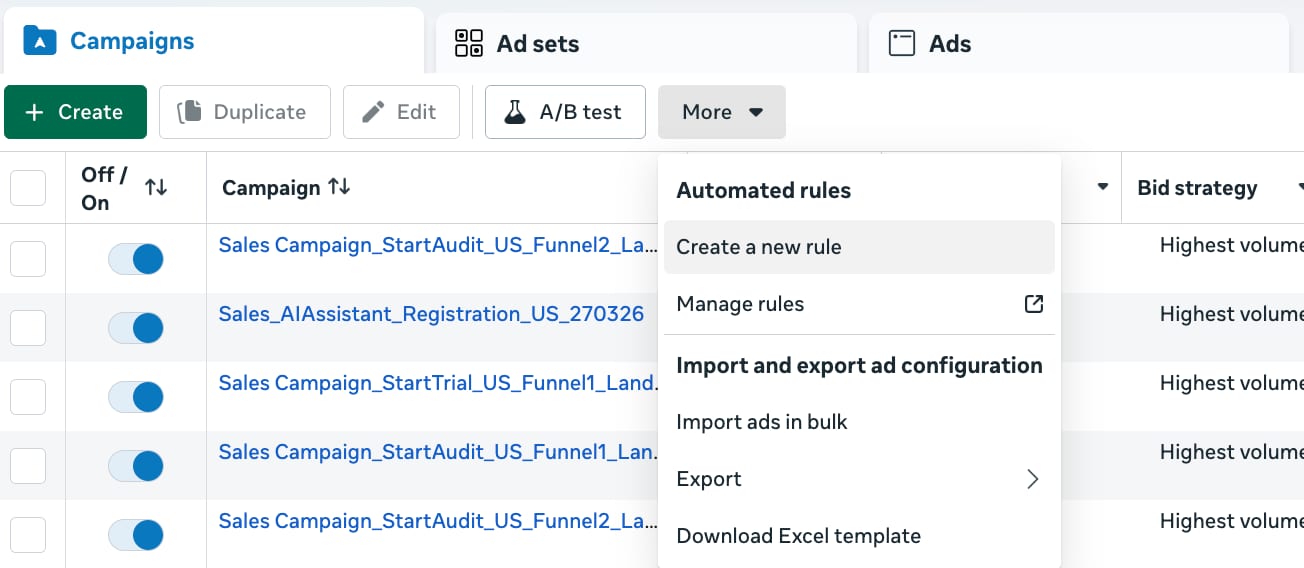
The native Excel template handles campaign structure — but creative files still need to be uploaded separately to the Media Library.
It's free and built in. No third-party access needed. For a handful of campaigns, it works.
The catch: the template handles campaign structure, not creative files. Images and videos still need to be dragged into the Media Library manually. The formatting is fragile too. One wrong column header and the import fails silently. There's no deduplication, so re-importing creates duplicates. And it's single-account only, so managing four accounts means running through the process four times.
As one Reddit user put it: "You can technically use the bulk upload sheet in Ads Manager but it's clunky and breaks in weird ways."
In our experience, this works for teams uploading fewer than 20 ads in a single account on an occasional basis. Beyond that, the limitations stack up fast.
Why people search for an alternative to Meta's bulk upload
Most teams come looking for a Facebook Ads Manager bulk upload alternative for the same three reasons. First, the Excel template doesn't actually upload creative files — it only builds campaign structure, so the manual drag-and-drop into the Media Library still happens. Second, it's single-account, so anyone running 3+ ad accounts repeats the entire process per account. Third, errors fail silently — one wrong column header and the import skips rows without telling you which ones. The "alternative" search isn't about replacing Ads Manager itself; it's about replacing the file-transfer step. Methods 2 through 5 below each solve that, with different trade-offs on cost, account-ban risk, and cross-platform support.
Method 2: Google Sheets templates
Several tools (Markifact being the most visible) offer Google Sheets templates that connect to Meta's API. You fill in campaign structure in a spreadsheet, and the template pushes it to Ads Manager.
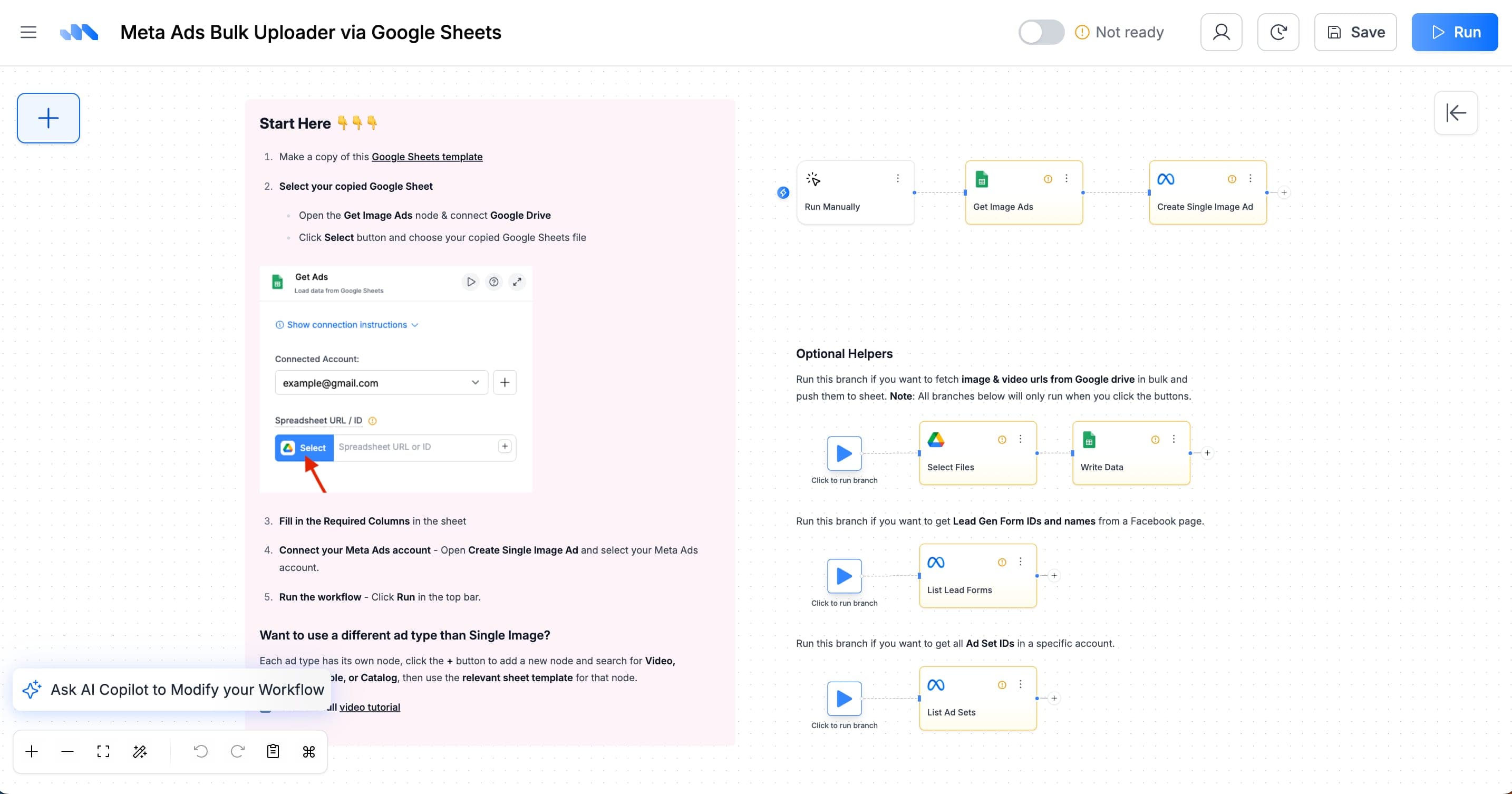
Markifact's Google Sheets template — campaign rows feed directly into Meta's API. Source: markifact.com
The interface is familiar. Teams already live in Google Sheets. You can customize columns and formulas, and the cost is low.
The same limitation applies though: these handle campaign structure, not creative file uploads. Creatives still need to be uploaded to the Media Library separately. Setup requires API configuration, and templates can break when Meta updates its API. There's a learning curve that's easy to underestimate.
We've seen this work for spreadsheet-native teams who want structured campaign creation and don't mind handling creative uploads as a separate step. But if the bottleneck is creative file transfers specifically, Sheets won't solve it.
Method 3: Paid bulk upload tools
Several dedicated platforms handle both ad creation and creative uploads: admanage.ai, kitchn.io, Birch (formerly Revealbot), Campaign Builder. These are purpose-built for the problem.
They're fast. Drag files, set targeting, launch. They support large batches and come with customer support and onboarding. For teams with budget, they remove friction.
The price tag is the issue. admanage.ai runs approximately $700/month. Others range from $300-500/month. For a single team, that's $3,600-8,400 per year on upload tooling alone. Most support Meta only, no TikTok, no cross-platform. And you're still downloading files to your computer first because none of them sync with Google Drive.
One Reddit thread captured the sentiment well: "Finally able to bulk upload ads without paying admanage $700 per month." The frustration isn't with the tools themselves. It's with paying that much for what is fundamentally a file transfer problem.
If your team has the budget and runs Meta exclusively, these tools do the job well. For most teams we talk to, the price relative to what you get feels off. $700/month for file transfers is hard to justify when free and cheaper options exist.
Method 4: API scripts and MCP servers
For teams with developer resources, Meta's Marketing API supports programmatic ad creation and creative uploads. MCP (Model Context Protocol) servers add an AI layer on top. You can query and manage ad data through Claude or Cursor.
The upside is maximum control and customization. You can tailor the workflow to anything your team needs. Open-source options are free.
The downside is serious. Meta is permanently banning ad accounts that connect through unverified apps. Most open-source MCP servers use your personal access token without rate limiting or app review. Meta's security systems flag this as unauthorized bot access. See our MCP servers guide for the ban-risk breakdown before connecting anything to your accounts.
Even without the ban risk, API scripts require ongoing maintenance. Meta changes its API regularly. What works today might break next month. For a deeper look at Facebook ads automation tools compared across the workflow chain, we covered that separately.
This is viable only for teams with dedicated developers who can maintain custom integrations, handle Meta's API changes, and navigate the app verification process.
Method 5: Scalemate — upload, launch, free
This is our tool. We built it because we ran into the same problem and none of the existing options solved it without a $700/month commitment.
The workflow: connect Google Drive (one-time setup), select files, choose destination (Meta, TikTok, or both simultaneously), push. Files land in the platform's Media Library without downloading anything to your computer.
Here's the workflow in action:
The difference from a pure upload tool: you can launch ads directly from those creatives into campaigns. Upload the files, set your campaign structure, go live. The full workflow from creative asset to running ad happens in one interface.
The free tier includes unlimited uploads, 100 ad launches per month, and 2 active automation rules. No credit card required. If your volume fits one ad account, it costs nothing. And because Scalemate is a verified Meta app with official API access, scoped permissions, and rate limiting, there's zero ban risk. Across all users, zero accounts banned.
Beyond Google Drive. Some teams don't keep creatives in Drive. Designers hand off assets through Airtable, an internal platform, or a shared Excel sheet with links. Scalemate connects to these sources too. Creatives flow automatically from wherever your design team puts them into Meta and TikTok's ad libraries. If your pipeline runs through a tool we don't support natively, the team builds the integration on request. Wherever your creatives live, they shouldn't require manual downloading and re-uploading to reach an ad platform.
Real numbers from real teams:
ZeptoLab (Cut the Rope, 2B+ downloads) delivers 2,000+ creative files through Scalemate from NextCloud. Upload time dropped 70%. The team saves 35 hours per month. Those hours went back to creative strategy, not file management. (measured Q1 2026)
KitUp (education, 1M+ users) connected their internal creative pipeline to Scalemate and launched 15,000+ ads through the platform. Creative deployment is 65% faster. Weekly hours on ad operations dropped by 25%. The upload-to-launch cycle that used to take half a day runs in minutes. (measured Q1 2026)
Try the free ad creative uploader →
5 methods compared
| Scalemate | Meta Bulk Import | Sheets Templates | Paid Tools | API / MCP | |
|---|---|---|---|---|---|
| Price | ✓ Free tier + paid | Free | Free-$50 | $300-700/mo | Free (DIY) |
| Platforms | ✓ Meta + TikTok | Meta only | Meta only | Mostly Meta | Meta (custom) |
| Source sync | ✓ Drive, Airtable, custom | ✗ | ✗ | ✗ | Custom build |
| Creative upload | ✓ | ✗ Structure only | ✗ Structure only | ✓ | ✓ |
| Launch ads | ✓ | ✗ | Partial | ✓ | ✓ |
| Deduplication | ✓ | ✗ | ✗ | Varies | Custom build |
| Multi-account | ✓ | ✗ | ✗ | ✓ | Custom build |
| Ban risk | ✓ None (verified) | None | None | Low | ✗ High |
| Setup | ✓ Minutes | Minutes | Hours | Hours | Days-weeks |
How to choose
Volume under 20 ads/week, single account. Meta's native import or Scalemate's free tier. No reason to pay.
Volume 20-100 ads/week, multiple accounts. Scalemate handles this on the free-to-paid range. If your team lives in Google Sheets and only runs Meta, a Sheets template might work.
Volume 100+ ads/week, enterprise. Paid tools or Scalemate's paid plans. The choice depends on whether you need TikTok support and cloud sync (Scalemate) or prefer a dedicated tool with white-glove support (admanage, kitchn).
Developer team available. API or MCP scripts give maximum control. Verify the app with Meta first. The time investment is real and ongoing.