TL;DR
- Meta Pixel Helper is Meta's free Chrome extension for checking whether your Pixel is installed and firing. Over 3,000,000 users, 3.9/5 rating (Chrome Web Store, checked July 25, 2026).
- Current version is 4.0.16, updated July 18, 2026, and it has required a Facebook login to open since a February 2026 update.
- A second, differently-IDed "Meta Pixel Helper" listing exists in the Chrome Web Store. Always verify the extension ID before installing.
- Pixel Helper only sees what happens in your browser. It can't confirm Meta's servers received the event, and ad blockers can hide real firing entirely.
- If you're about to run automation rules on ROAS or cost-per-purchase, verify your pixel signal first. Bad data in means bad decisions out.
Why "Pixel Helper Says It's Fine" Doesn't Always Mean It's Fine
"My Meta Pixel seems to be working fine in both the Pixel Helper and Shopify. They're detecting events without any issues," one media buyer wrote on r/FacebookAds in May 2026, right before explaining that Events Manager showed nothing for those same actions. Meta Pixel Helper is the free Chrome extension Meta ships to check whether your Pixel is installed on a page and whether it's firing standard events, and this is exactly the gap it can't see across.
It's the fastest way to answer "is this thing even on" during setup or a troubleshooting call. What it can't do is confirm the event actually reached Meta's servers, and that gap is where a lot of wasted debugging time comes from.
What media buyers are actually running into
The pattern shows up across setups. On r/FacebookAds, one person reported the extension "doesn't detect the pixel at all" on a site with no ad blockers running. On r/GoogleTagManager, another traced a missing event to an ad blocker quietly stripping the network call before it ever reached Meta. A third thread, in r/PPC, described Pixel Helper returning a specific message: "the pixel has not been activated for this event and no information has been sent to Meta." Accurate, but not exactly self-explanatory if you don't already know what triggered it.
None of this means Pixel Helper is a bad tool. It means it answers one narrow question well ("did my browser fire this?") and gets asked a much bigger one ("is my tracking working?") that it was never built to answer alone.
Why This Matters Before You Turn On Automation
If you're running automation rules that pause, scale, or reallocate budget based on ROAS or cost-per-purchase, the rule is only as good as the signal feeding it. A pixel that looks "active" in the browser but isn't reliably reaching Meta will feed automation decisions built on partial data. Rules can end up scaling a campaign that's actually underperforming, or killing one that isn't. That's a real risk for teams built for multi-account performance setups, where one misconfigured pixel can quietly touch several accounts' automation logic at once.
Tracking gaps also tend to resurface after platform changes. Following Meta's recent algorithm updates, several media buyers reported pixel or matching issues that had nothing to do with their original setup. It's worth a re-check any time Meta ships a major delivery change, not just at initial install.
Installing the Real Meta Pixel Helper (Not a Lookalike)
Confirm the official listing
Before installing anything, make sure you're on the official Meta Pixel Helper listing, published by Meta. A separate listing, "Pixel Helper for Meta," ranks alongside it in search results under a near-identical name and isn't published by Meta. It may be entirely benign, but there's no reason to grant browser permissions to an unverified copy when the real one is one click away. This matters more for a team whose own pixel and ad-account access is worth protecting, not less.
Install steps
- Go to the Chrome Web Store and open the official listing linked above (published by Meta).
- Click "Add to Chrome" and confirm the permissions prompt.
- Log in with your Facebook account when prompted. This has been required since a February 2026 update, and the popup won't open without it.
- Pin the extension so its icon stays visible in the toolbar while you test.
Reading the Pixel Helper Popup
Click the pinned icon on any page and the popup opens straight to a read on that page: which pixels it found, and whether the events fired without a browser-side problem.
What the badge and status colors mean
Per Meta's own Pixel Helper documentation, the extension flags a page one of three ways: a clean read (base Pixel and event code found, no browser-side errors), a warning state (Pixel found, but something about the event firing looks incomplete), or an error state (a specific problem the extension can name, like a missing parameter). All three readings describe what happened in your browser during that page load only. None of them confirm that Meta's servers logged the event on their end.
Every Pixel Helper Message Worth Knowing
Rather than list every possible string the extension can show, here's what real media buyers have actually run into and what it means in practice:
| What you see | What's actually happening | What to check |
|---|---|---|
| Clean read, no errors flagged | The base Pixel and event code loaded and fired with no browser-side problems | This confirms firing, not receipt; pair it with Events Manager or Test Events |
| "The pixel has not been activated for this event and no information has been sent to Meta" (r/PPC, 2024) | The Pixel base code is present, but the trigger for that specific event never ran on this page or action | Check the event trigger/conditions, not the base install |
| No pixel detected at all, with no ad blockers active (r/FacebookAds, 2024) | Often a loading-order issue: the base code fires after the page has already rendered, common in tag-manager setups | Check whether the Pixel loads via GTM and confirm trigger timing |
| Pixel Helper and the storefront both show "working," but Events Manager shows nothing (r/FacebookAds, 2026) | A break somewhere between browser-side firing and Meta's server-side receipt, common on Shopify setups with app conflicts | Cross-check the same event in Events Manager's Test Events tab, not just the popup |
| Console shows events blocked by an ad-blocker extension (r/GoogleTagManager, 2025) | Ad blockers can suppress the pixel's network request before it leaves the browser, which also hides it from Pixel Helper | Test with all ad blockers disabled before concluding the pixel itself is broken |
Pitfalls Pixel Helper Won't Warn You About
Ad blockers cause false negatives
An ad blocker doesn't just hide ads from a visitor. It can strip the Pixel's outbound request entirely, so Pixel Helper reports nothing even though your implementation is correct. Always test in a clean browser profile with blockers off before assuming the code is broken.
GTM and Shopify signal-chain breaks
Tag manager setups add a step between "code is on the page" and "event actually fires," and that's exactly where things quietly break: a trigger condition that's slightly too narrow, a tag that fires before the dataLayer variable it needs is populated, or a Shopify app injecting a conflicting pixel snippet. Pixel Helper only sees the end result in the browser, not which layer failed.
"Activated" in Pixel Helper ≠ "received" in Events Manager
This is the split that causes the most wasted time: Pixel Helper telling you an event fired is not the same claim as Events Manager showing Meta received it. Treat a green Pixel Helper read as step one of verification, not the finish line.
Beyond Pixel Helper: Test Events and Conversions API
For the "did Meta actually get this" question, Meta's own Events Manager includes a Test Events tab that shows events as they arrive server-side, in real time. It's the direct counterpart to what Pixel Helper checks in the browser, and pairing both is the fastest way to isolate exactly where a signal breaks.
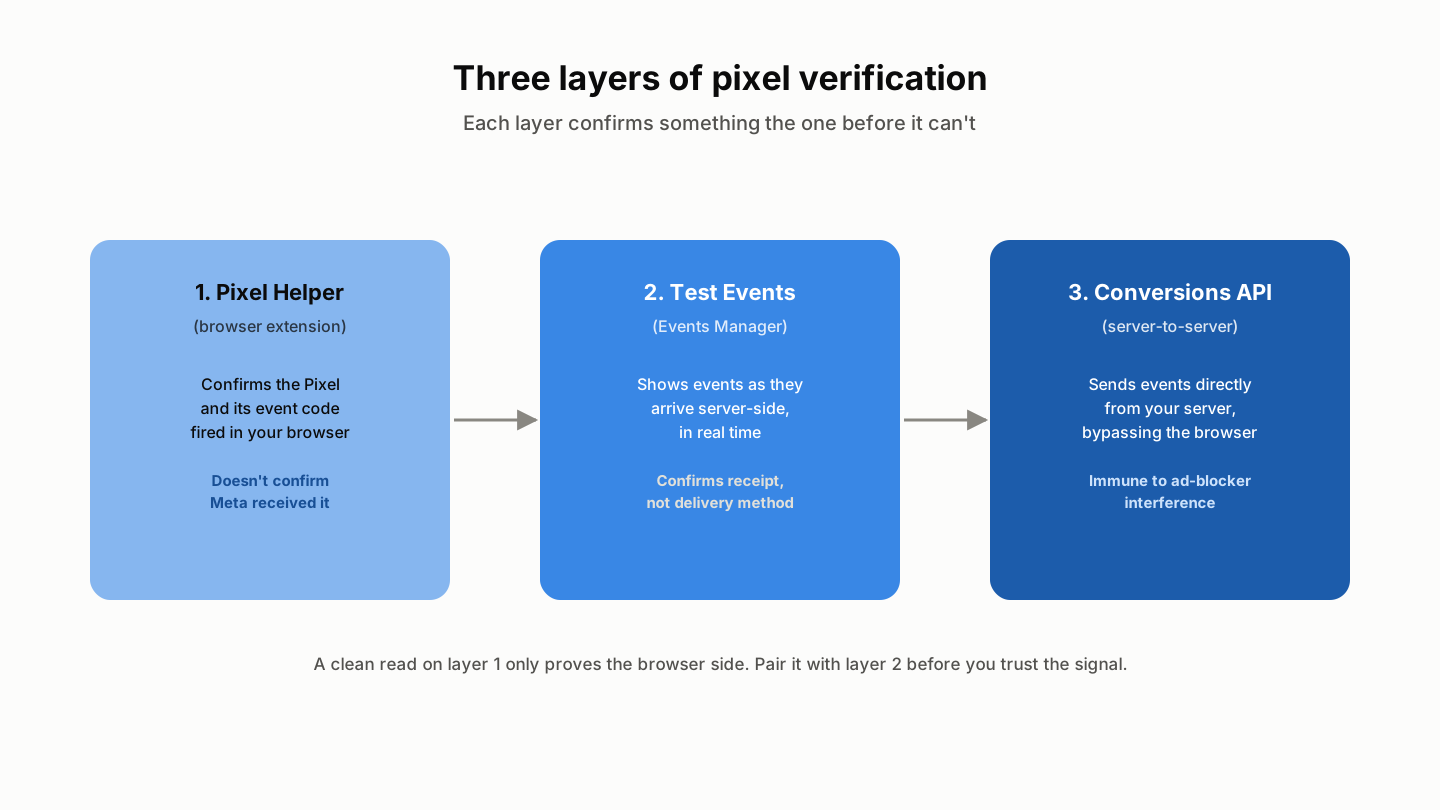 Each layer confirms something the one before it can't.
Longer term, the Conversions API sends events server-to-server, alongside or instead of the browser pixel, which sidesteps ad-blocker interference since it doesn't depend on a browser request firing at all. If tracking gaps keep resurfacing despite a clean Pixel Helper read, that's usually the sign it's time to add it rather than debug the browser pixel further. This is also worth revisiting as part of automating your Facebook ad operations more broadly, since reliable server-side signal is what makes automation worth trusting in the first place.
Running Meta and TikTok Together
If you're managing both platforms, TikTok has its own equivalent extension (TikTok Pixel Helper) for checking TikTok Pixel installs the same way. This piece focuses on the Meta side in depth; if your team runs bulk creative uploads to Meta and TikTok side by side, treat pixel verification as a per-platform checklist item, not a one-and-done step, since each platform's tool only reports on its own tracking.
Verify your pixel signal before you lean on it for automated decisions. If your rules are already live, confirm your pixel signal is accurate first, then let them run on data you actually trust.