Your ads were running yesterday. This morning Ads Manager says your advertising access is restricted, campaigns are paused, and the Request review button either sits there unhelpfully or is missing. Nobody tells you which ad, which policy, or which day. A restricted Facebook ad account is one Meta has limited rather than removed: the account still exists, but Meta has cut back what it lets you do with it.
Getting a Facebook ad account restricted with no explanation is one of the most common stories in performance marketing. Advertisers post it in r/FacebookAds and r/PPC every week, including accounts restricted before a single ad ever ran and accounts restricted with no active ads at all.
TL;DR
- Restricted is not disabled. A restriction limits what you can do. An account disabled for a policy violation and ineligible for six months cannot be reinstated at all.
- A restriction lands on one of three levels: your personal Facebook account, your business portfolio, or a single ad account. Identify the level first, because the fix differs.
- Seven documented reasons sit behind most restrictions, including suspected compromise or hacking, which Meta names explicitly.
- The official route is four steps in Business Support Home: confirm your identity, complete verification, secure your account, request a review.
- Two clocks get confused constantly. Six months is the ad account reinstatement limit. 180 days is the appeal window for a suspended personal Facebook account.
What "your advertising access is restricted" actually means
You keep the account. What Meta cuts back is most often your ability to spend, to change payment settings, or to add people. Meta's About Advertising Restrictions page puts the principle plainly: if Meta finds that an advertiser does not follow the Advertising Standards or other policies and terms, they may face advertising restrictions.
The word people reach for is "banned", and that muddies the diagnosis. Restricted means limited but present. Disabled means access is gone pending a decision. Permanently disabled means the door is shut. Meta is specific about the last one: if your ad account is disabled for a policy violation and remains ineligible for reinstatement for six months, any unused prepaid services may be forfeited where allowed by law, and after that timeframe the account cannot be reinstated (Meta Business Help Center, checked 27 July 2026).
The three levels a restriction can hit
- Your personal Facebook account. The person, not the business. Widest blast radius, because it follows you to every asset you touch.
- Your business portfolio. The container Meta used to call Business Manager. Restrict it and every ad account inside stops with it.
- An individual ad account. The narrowest hit. Other accounts in the same portfolio can often keep running.
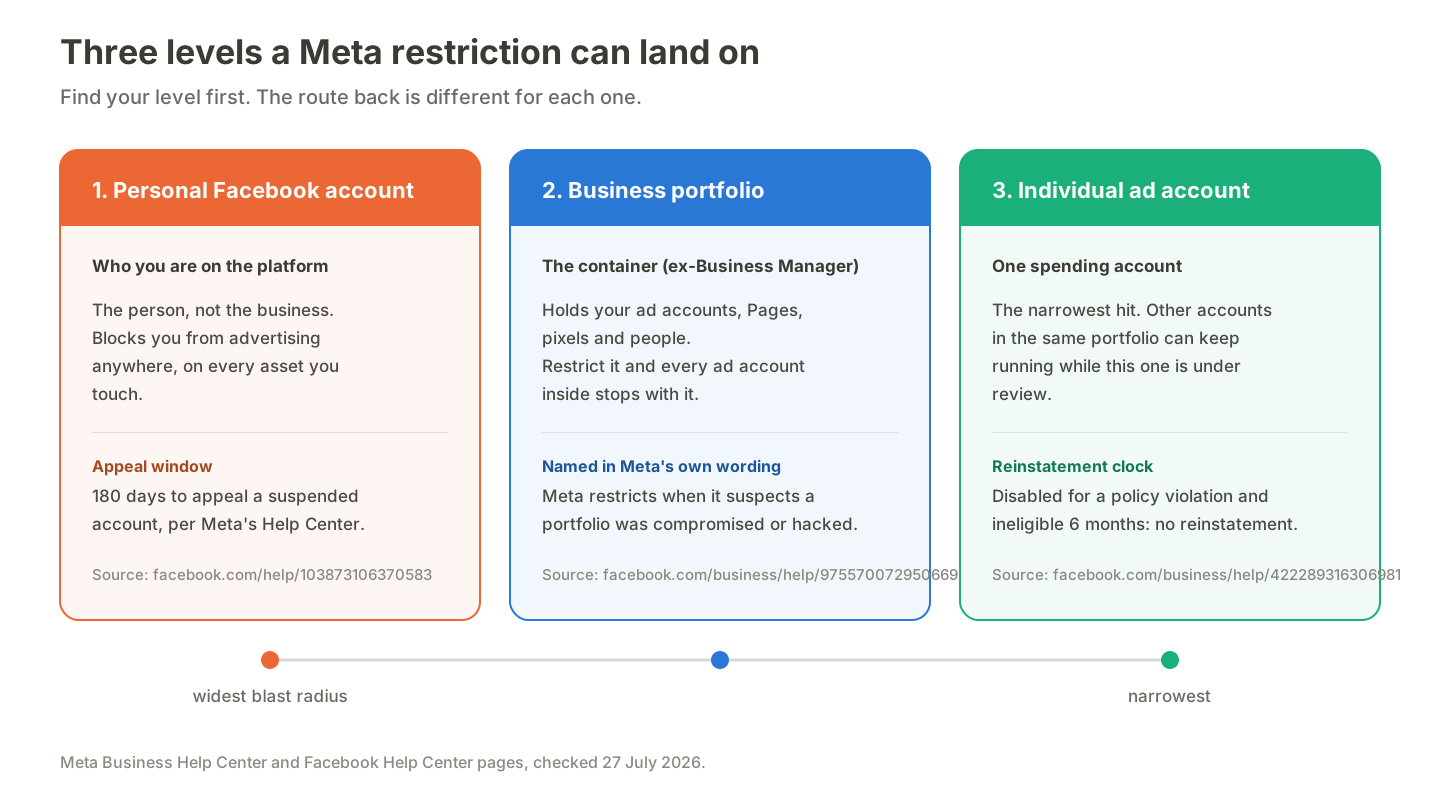
Find the level first. The fix is different for each.
What a restriction takes away
Meta lists the limitations rather than leaving them vague. Per the same page, restrictions can include limited advertising spending or a lower payment threshold, loss of access to some payment features, and loss of the ability to add admins, partners or users.
That last one catches agencies out: a restriction that leaves campaigns running can still block you from onboarding a client's asset.
Why Meta restricted your ad account: 7 documented reasons
1. Policy violations
The default assumption, and often correct. This covers the creative, the destination page, and the product itself, judged against Community Standards, the Advertising Standards, and Commerce Policies. A compliant ad pointing at a non-compliant page still counts.
2. Suspected compromise or hacking
This is in Meta's own wording and in almost none of the guides written about it. Meta states it may apply advertising restrictions when it suspects an advertiser's business portfolio or business assets have been compromised or hacked, and links to its hacked-account recovery flow.
That reframes the problem: a restriction can be Meta protecting you rather than punishing you. The r/FacebookAds thread titled "Facebook Ads Account Hacked – $112,311 Stolen in 30 Minutes (2FA Was Enabled)" is the scenario this rule exists for. Treat an unexplained restriction as a possible security event and check your admins and payment methods before writing an appeal.
3. Payment and authenticity flags
Failed charges, a payment method that does not match the business, a billing country inconsistent with account activity, or an unverified business identity. Meta gates a lot of capability behind business verification, and gaps here surface as restrictions rather than as a clear prompt.
4. Feedback score decline
Meta collects post-purchase feedback from buyers and surfaces it in Account Quality, alongside your restriction status, in Business Support Home. A falling score raises costs and cuts delivery well before it becomes a restriction.
Numeric cut-offs circulate widely on other blogs. Those thresholds do not appear on any Meta help page we could find, so this guide does not repeat them. Check your own score and treat its direction as the signal.
5. Linked or flagged business assets
Meta evaluates assets as a connected graph. A restricted Page, a previously disabled ad account, or an admin whose personal account is already restricted can pull a clean asset into review. This is why "I made a fresh ad account and it died immediately" is such a common story.
6. Unusual activity: logins and budget spikes
Sudden geography changes, many people sharing one login, access from a new device mid-campaign, or a budget jumping far outside the account's pattern. None breaks a rule. All look like the early signature of a compromised account, which loops back to reason 2.
7. Unverified third-party API access
The one nobody documents. How a tool reaches your ad account is itself a signal, and it gets its own section below.
How to get it back: Meta's official path, step by step
Meta publishes exactly one route, and its troubleshooting page lists four steps. Work them in order.
Step 1: confirm your identity. In Business Support Home, open Account status overview in the left menu and select the restricted account you want to troubleshoot.
Step 2: complete verification. If business verification is the gap, budget real time for it. Meta states that a decision on a verification submission may take up to 14 business days (Meta Business Help Center, checked 27 July 2026). That is the only verification timeframe we could find published by Meta. The 48-hour and 24-to-72-hour figures quoted on other blogs do not appear on Meta's pages, so plan against 14 business days.
Step 3: secure your account. Given reason 2, do this even if you are certain you were not hacked. Reset access, review every admin and partner, check payment methods, and remove app connections you no longer use.
Step 4: request a review. Meta's review request page confirms that if you believe your business portfolio, ad account, Page or user account was incorrectly restricted from advertising, you may be able to request a review. Select Account status overview, choose the account, then select Request review under "What you can do".
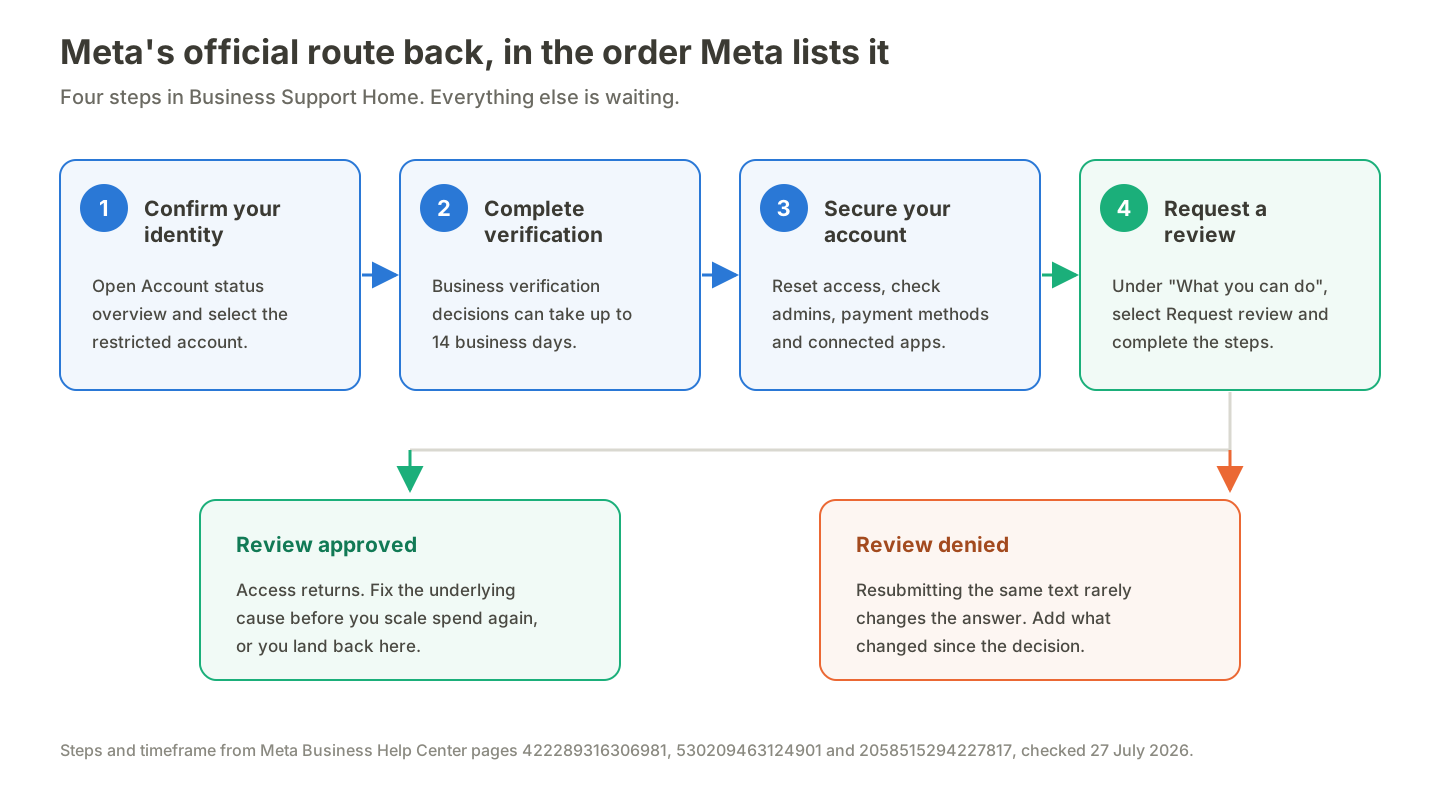
One route is official. The rest is waiting.
If the review is denied
Resubmitting identical text rarely changes the outcome. Say what changed since the decision: the policy you corrected, the admin you removed, the verification you completed, the connection you revoked.
This is where the two clocks matter, and where most guides go wrong by merging them. Six months is the ad account rule above. 180 days is a different thing: the window to appeal a suspended personal Facebook account before Meta permanently disables it (Facebook Help Center). Check which one you are racing.
The restriction cause no other guide lists: how your tools reach your account
Every guide on this covers policy, payments and appeals. None mentions the tools connected to the account. Meanwhile advertisers raise it unprompted: a post asking whether read-only Marketing API reporting is safe after seeing ban reports, and a discussion of a free Meta Ads MCP where a commenter reports a permanent ban. Those are community reports, not verified case files, but buyers already suspect this link and have nowhere to read about it.
Our position: the connection method is not an implementation detail. It changes what Meta sees.
Official Marketing API vs browser automation
Browser automation and DOM scraping drive Ads Manager the way a person would, through your logged-in session. From Meta's side there is no app identity, no review record, no audit trail. There is a human account performing mechanical actions faster than a human can. That is not forbidden, and it is also indistinguishable from the patterns reason 6 exists to catch.
The official Marketing API connects as a registered Meta app using a scoped token you granted, with a call pattern Meta expects and rate-limits.
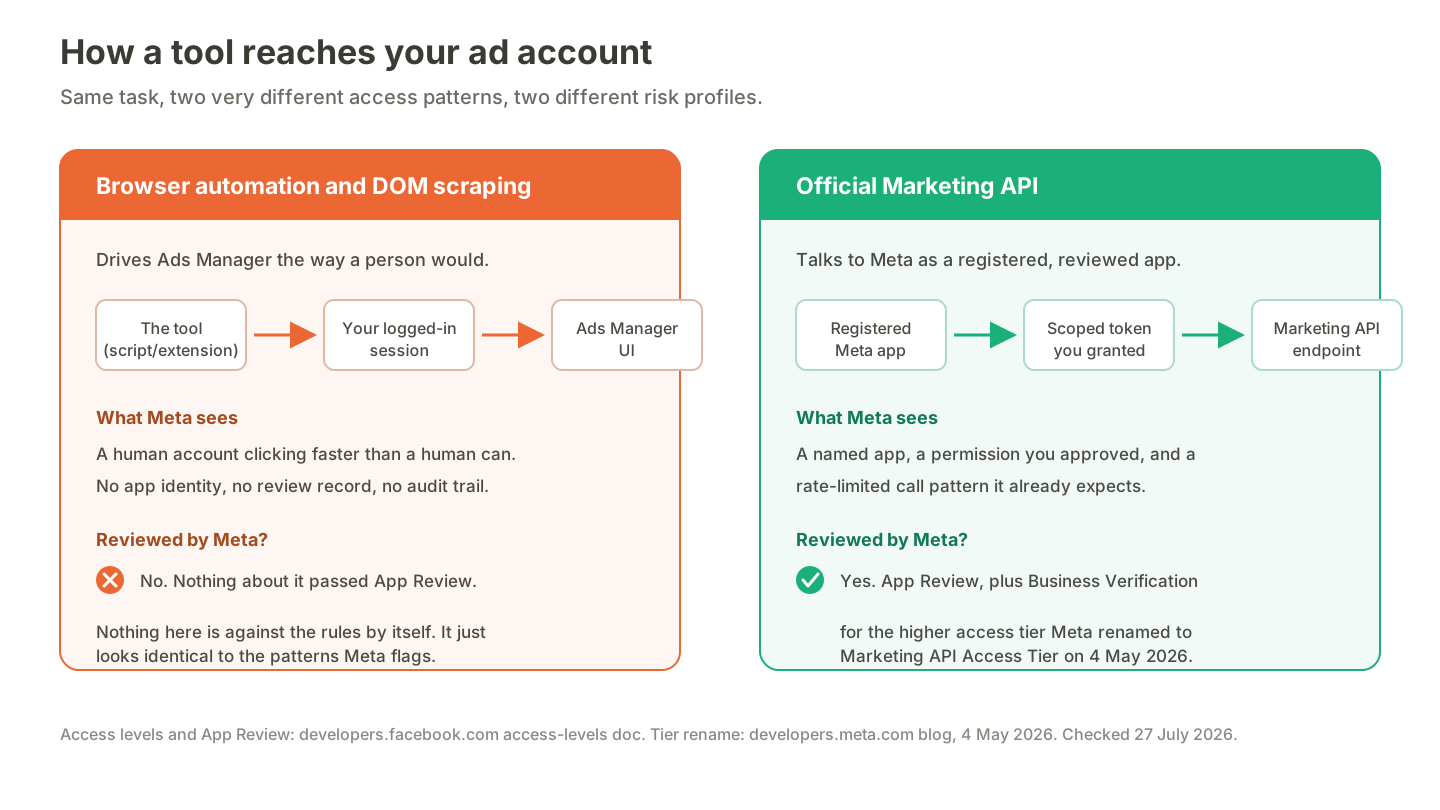
How a tool reaches your account changes your risk.
What "verified" means in Meta's terms
The word gets used loosely in marketing copy, so here is Meta's own vocabulary.
- App Review. Meta describes it as the process that lets it verify that your app uses its products and APIs in an approved manner, and says it tests apps to confirm they actually use the permissions requested (developer docs).
- Standard vs Advanced Access. Standard Access permissions can only be requested from users with a role on the app. Advanced Access can be requested from any user, and must be approved per permission through App Review (access levels documentation).
- Business Verification. No ambiguity here: Advanced Access requires business verification, in force since 1 February 2023. Apps holding it must also complete an annual Data Use Checkup.
- The tier names changed in May 2026. On 4 May 2026 Meta renamed Ads Management Standard Access to the Marketing API Access Tier, relabelling Standard Access to Limited Access and Advanced Access to Full Access, and lowered the qualifying requirement from 1,500 to 500 calls in 15 days with an error rate under 15%.
A vendor that has been through App Review and business verification has handed Meta a reviewable identity. One that scrapes your session has not. The vendor-by-vendor picture sits in our guide to verified vs unverified Meta apps.
Applying that to ourselves: Scalemate is a verified Meta app, and its Marketing API access is granted scope by scope at the Limited Access tier, in the naming Meta introduced on 4 May 2026 (Scalemate, confirmed 27 July 2026). Hundreds of ad accounts are operated through that app (Scalemate internal, as of 27 July 2026).
6 questions to ask any tool before you connect it
- Does it connect through the official Marketing API, or drive Ads Manager in a browser session?
- Has the app been through Meta App Review, and for which permissions?
- Has the vendor completed business verification, and does the app hold the higher access tier?
- What does the token you grant allow: read-only reporting, or full campaign write access?
- Can you revoke that access yourself, in one place, without contacting support?
- When Meta changes the API, who absorbs the change, the vendor or you?
Ask these of any vendor, including us and the Facebook ads automation tools we have covered elsewhere. If you are weighing named platforms, how Madgicx compares applies the same questions.
Account hygiene, and the mistakes that make things worse
What keeps you out of review
- Keep structure boring. One portfolio, clearly owned assets, admins you can name, two-factor on every one of them. Complexity turns one flagged asset into a chain of them.
- Move budgets in steps, not leaps. Doubling spend overnight reads as anomalous. If scaling is the plan, automated ad rules apply increases on a schedule rather than in one manual jump.
- Keep access patterns stable. Named users with their own logins, no shared password travelling between countries.
- Give launches one source of truth. Teams that launch ads in bulk through the official API produce one consistent, attributable pattern instead of several people improvising in the UI.
What makes it worse
Burner accounts and proxies. Community advice contradicts itself here. A five-year-old r/FacebookAds post on handling bans suggests spinning up multiple ad accounts inside a Business Manager and keeping them warm with small spend. More recent r/PPC discussion argues the opposite: burner accounts behind proxies read as fraud, and device fingerprinting links them so everything falls together.
Our position, following from reason 5: the older advice is a myth worth retiring. Meta evaluates linked assets as a graph, and an account created while a review is open is a new edge pointing at a restricted node. Deliberately obscuring where you log in from, the subject of a dedicated r/PPC thread, is the exact signal reason 6 is built to detect.
Before you launch the next campaign
If you are locked out right now, work the four steps and write one good review request. If everything still works, spend ten minutes on the six questions above and check what holds a token to your ad account.
If bulk launching is what drags your team into risky workarounds, our free creative uploader moves creatives from Drive into Meta through the official API, with no browser scripting.
One caveat: nothing here is a guarantee. Meta does not publish its enforcement thresholds, and no vendor can promise your account stays clear or that an appeal succeeds. Scalemate does not unban, appeal, or restore ad accounts. Results vary by account setup, niche, and budget.
All Meta pages cited above were checked on 27 July 2026.