Meta's automated rules let you put parts of campaign management on autopilot — pausing waste, adjusting budgets, and sending alerts based on performance thresholds you define. They are one of the most practical features inside Meta Ads Manager, and also one of the most underused. This guide covers how to set them up correctly, what they can and cannot do, and what to consider when native rules are no longer enough.
What Are Facebook Automated Rules?
Facebook automated rules are conditional instructions built into Meta Ads Manager that monitor campaign performance and take action when specific criteria are met. They follow a simple if/then structure: if a metric crosses a threshold, then pause, adjust, or notify.
The available actions include four categories: auto-pause ads or ad sets, adjust budgets up or down, adjust bids, or send a notification without changing anything. Rules can check against 41 different conditions — everything from cost per result and ROAS to frequency and impressions.
To find them, open Meta Ads Manager, navigate to the campaign, ad set, or ad level, and select "Rules" from the toolbar. From there, you can create a new rule or manage existing ones.
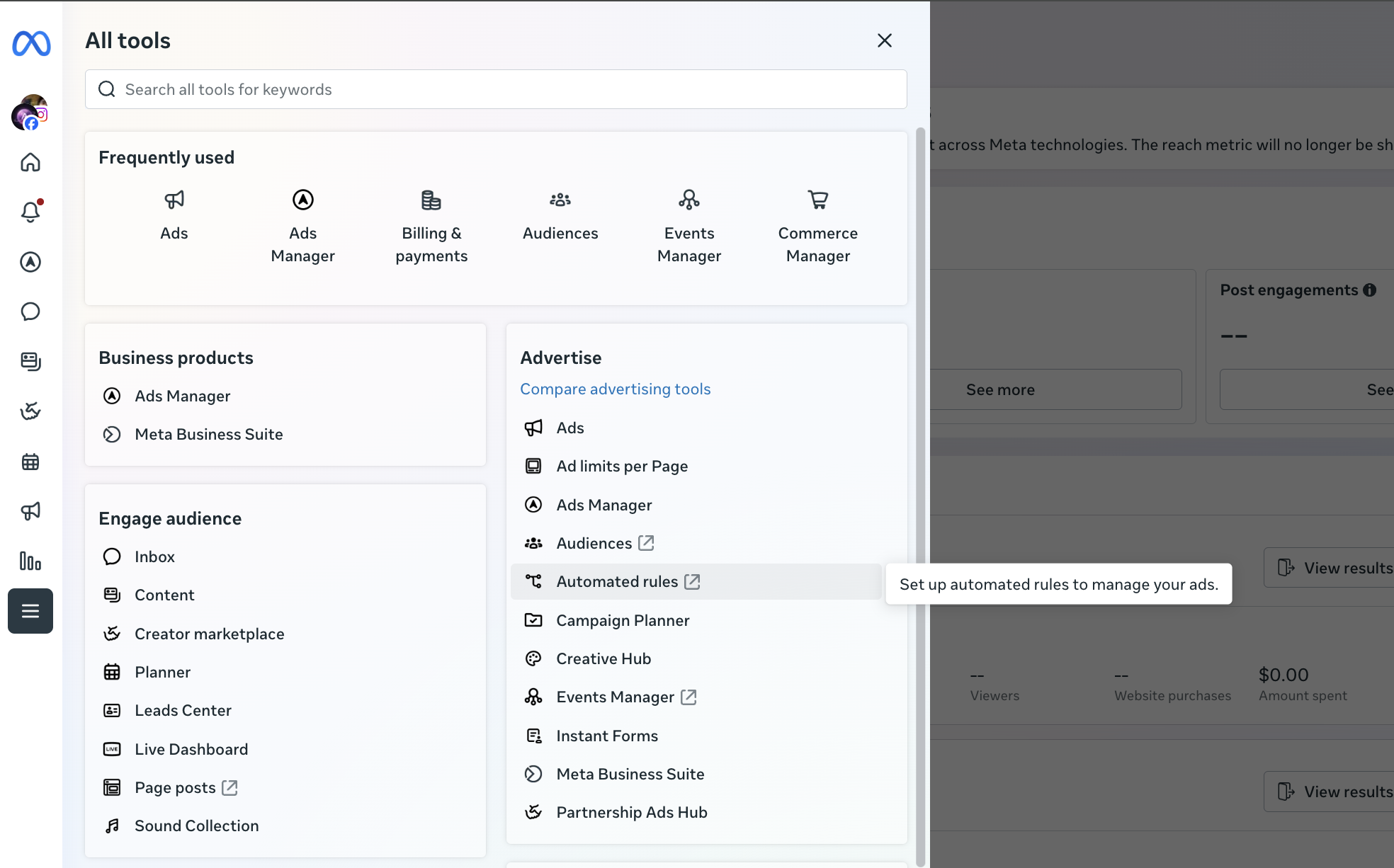
This feature is most useful for media buyers managing 10 or more campaigns. Below that threshold, manual checks may be faster than the time spent configuring rules. Above it, facebook campaign optimization automation becomes essential just to keep up.
How to Set Up Automated Rules in Meta Ads Manager
Setting up meta ads automated rules takes about five minutes per rule. The interface is straightforward, but the decisions behind each setting matter more than the clicks. Here is how to create automated rules on facebook step by step.
Step 1 — Choose What to Control
Every rule applies to one level: campaigns, ad sets, or ads. You cannot mix levels within a single rule. A rule that pauses underperforming ad sets cannot simultaneously adjust campaign budgets — that requires a separate rule.
Pick the level based on where you make optimization decisions. Most media buyers start at the ad set level because that is where audience targeting and budget allocation live.
Step 2 — Set Conditions
Conditions define what triggers the rule. Meta offers 41 condition options, including cost per result, ROAS, frequency, impressions, CTR, and amount spent.
There is one constraint worth noting early: rules use AND logic only, and each rule supports one condition. If you want to pause an ad set when ROAS is below 1.2 AND frequency is above 3, you need two separate rules. There is no OR logic available — you cannot say "pause if ROAS is low OR if CPA is high" in a single rule.
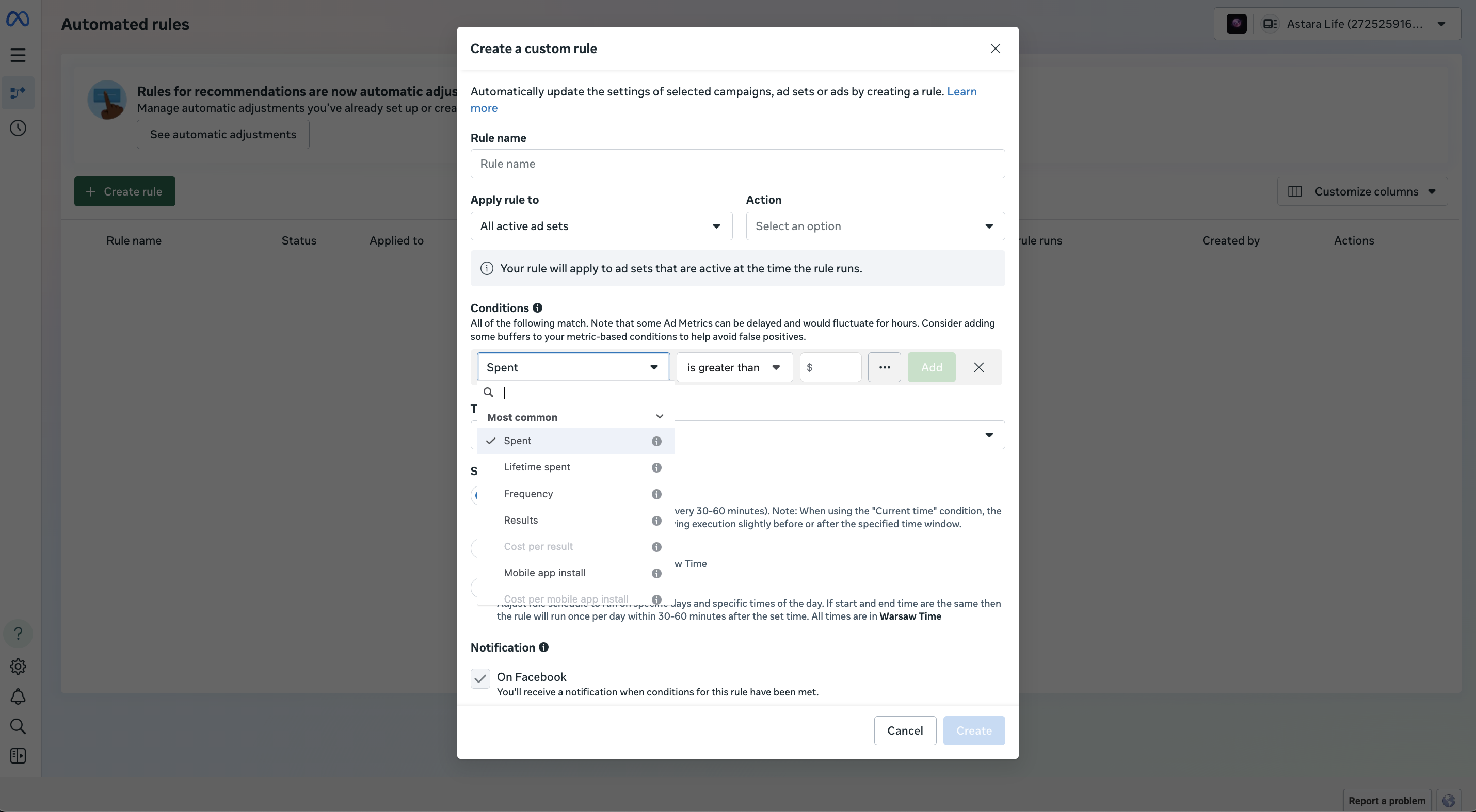
Choose a time window for the condition carefully. A 1-day window reacts fast but can trigger on noisy data. A 7-day window is more stable but slower to act. For most facebook ad rules setup configurations, a 3-day window strikes a reasonable balance.
Step 3 — Define the Action
Four actions are available:
- Pause the campaign, ad set, or ad
- Increase or decrease the budget by a set amount or percentage
- Adjust the bid by a set amount or percentage
- Send notification only — no changes made
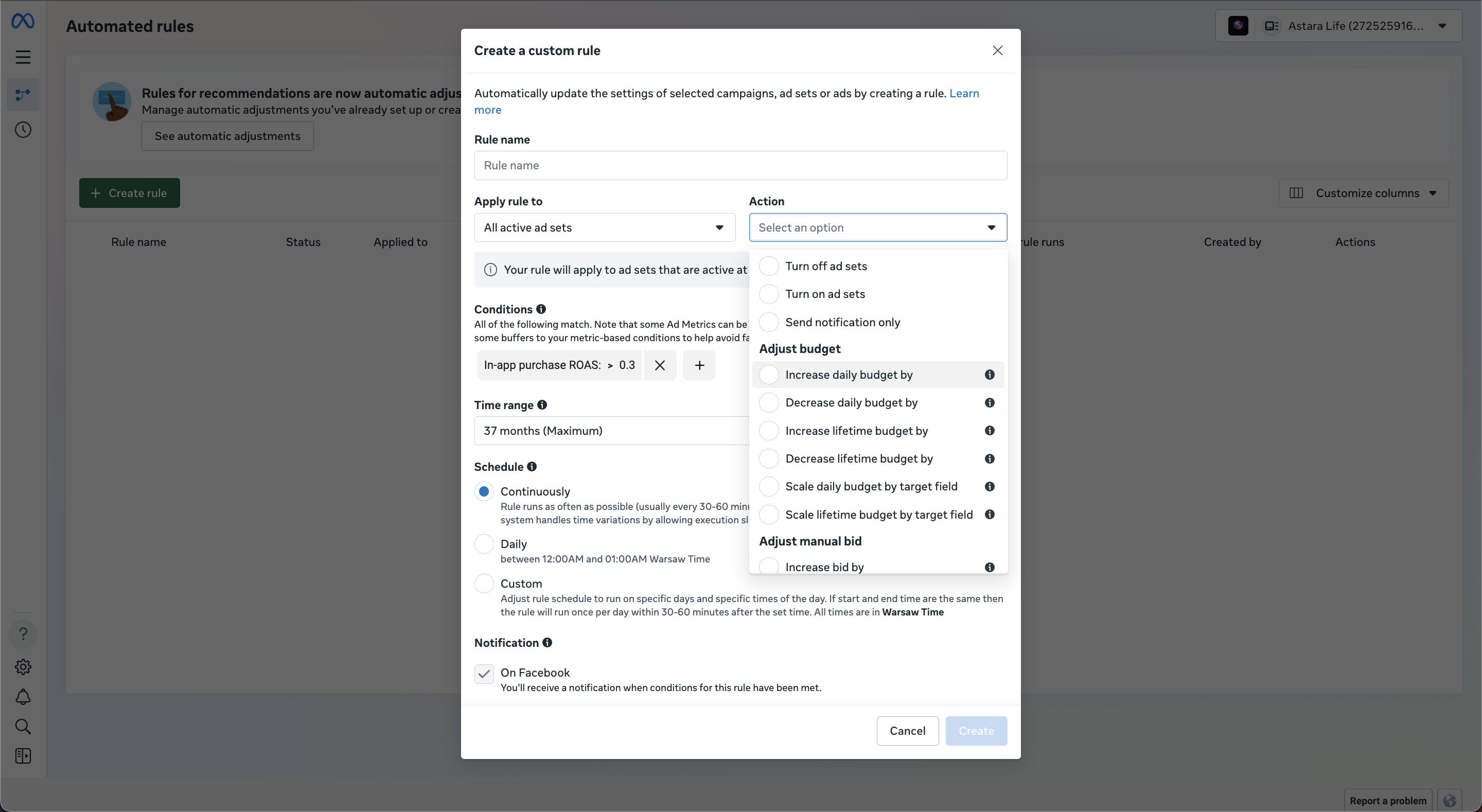
A practical tip: start every new rule with notification only for the first few days. This lets you verify the rule triggers when expected before giving it permission to change anything. Automated budget management meta ads workflows should be tested before they run live.
Step 4 — Set Schedule and Naming
Rules can run continuously (checking every 30 minutes), daily, or on a custom schedule. For budget adjustments, daily is usually safer — it prevents the rule from firing multiple times in a single day and compounding changes.
Naming matters more than most people expect. When managing 50 or more rules, a clear naming convention prevents confusion. A format like [Level]_[Action]_[Condition]_[Threshold] works well — for example, AdSet_Pause_ROAS<1.2_3d or Ad_Alert_Freq>3_7d. This becomes critical at scale when automated rules facebook ads manager accounts start to feel cluttered.
Facebook Automated Rules Examples
Theory only goes so far. Here are four practical examples with specific numbers, ready to adapt to your own accounts.
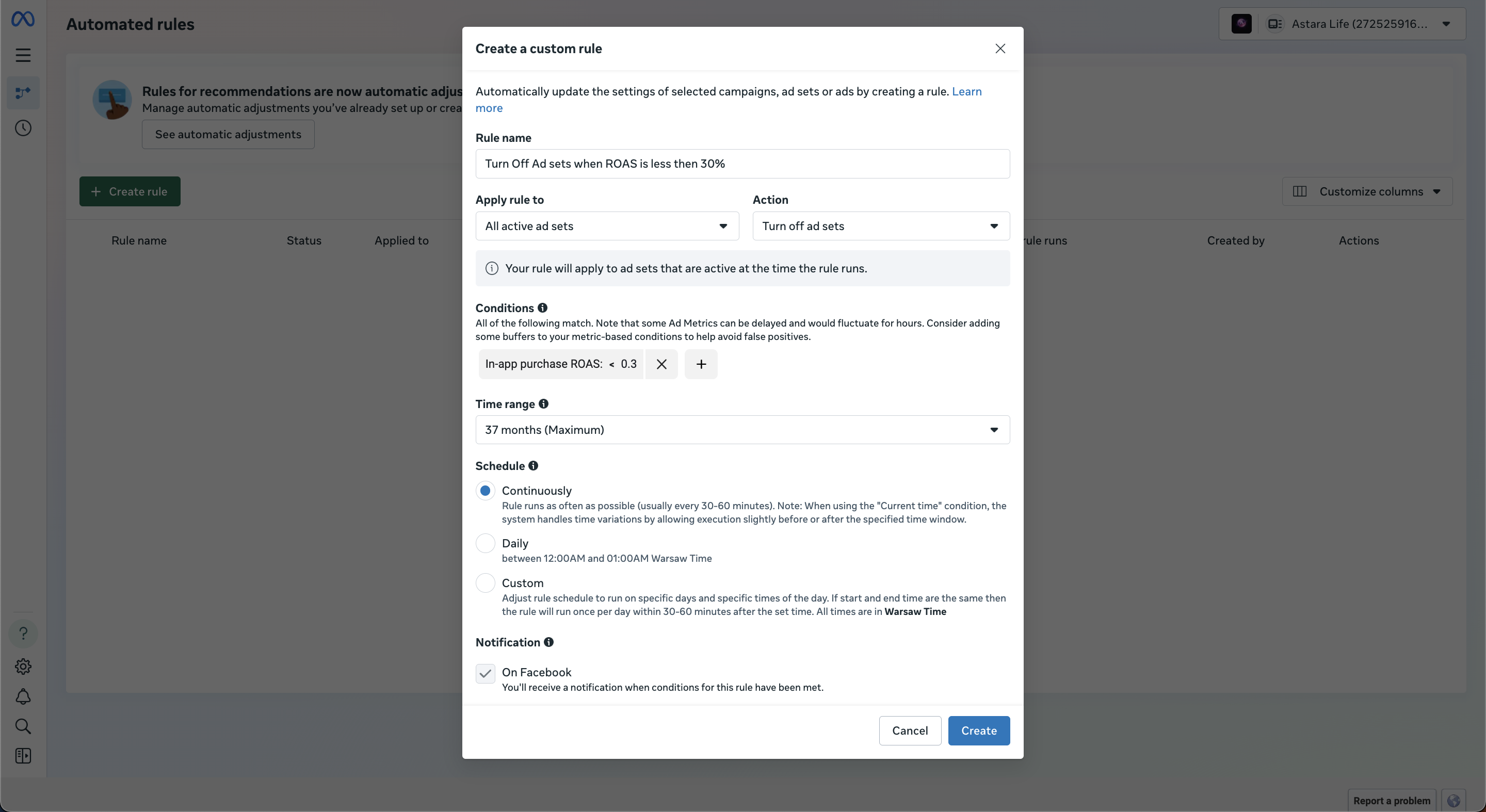
1. Pause ad set if ROAS drops below target
Use this to auto pause facebook ads based on roas when performance falls below breakeven.
- Condition: ROAS less than 0.3 over the last 3 days
- Action: Pause ad set
- Schedule: Continuous
- When to use: On prospecting campaigns where you need to cut losses fast. Adjust the 0.3 threshold to match your actual breakeven ROAS.
2. Increase budget on winning ad sets
This is one of the most common native rules for budget scaling — rewarding what works with more spend.
- Condition: Cost per purchase less than $25 over the last 3 days
- Action: Increase daily budget by 20%
- Schedule: Once daily
- When to use: On ad sets that have exited the learning phase and show consistent results. Set the schedule to daily to prevent compounding (a 20% increase firing every 30 minutes would double the budget within hours).
3. Turn off fatigued ads
Use native rules to pause underperforming ads that have worn out their audience.
- Condition: Frequency greater than 3.0 over the last 7 days
- Action: Pause ad
- Schedule: Daily
- When to use: On retargeting campaigns where audiences are small and creative fatigue sets in quickly. Pair this with a second rule checking CTR below 1% for a tighter filter — though each condition requires its own rule.
4. Alert when daily spend exceeds cap
Not every rule needs to change something. Sometimes a notification is enough.
- Condition: Amount spent today greater than $500
- Action: Send notification
- Schedule: Continuous
- When to use: As a safety net on campaigns with flexible budgets. This catches runaway spend without pausing anything prematurely.
These four patterns cover the majority of facebook automated rules best practices. Build from here, adjusting thresholds to match your margins and scale.
Limitations of Native Facebook Automated Rules
Understanding where a tool stops is as important as knowing what it does. Native Meta rules work well for simple, single-condition automation. They hit walls when complexity increases. Here are the specific limitations, documented and practical.
Maximum 250 rules per account. According to Meta's limits documentation, each ad account can hold up to 250 rules. Accounts with dozens of campaigns across multiple objectives can reach this ceiling.
Only AND logic, no OR. You cannot create a rule that says "pause if ROAS is below target OR CPA is above target." Each scenario requires a separate rule, which accelerates how fast you hit the 250 cap.
One condition per rule. Compound conditions like "ROAS < 1.2 AND spend > $100 AND frequency < 2" require three individual rules, all pointed at the same assets.
One level per rule. A rule applies to campaigns, ad sets, or ads — never a combination. Cross-level logic (like pausing an ad set based on campaign-level ROAS) is not possible.
No rule duplication. Every rule is built from scratch. There is no template system, no copy-paste, and no way to apply the same rule across multiple ad accounts without manually recreating it in each one.
No rollback after scaling. If a budget scaling rule increases spend by 20% and performance drops the next day, the budget stays elevated. There is no native mechanism to reverse the change automatically. Scaling facebook ads with rules requires manual monitoring to catch these situations.
No cross-account management. Each rule lives inside one ad account. Agencies managing 10 or 20 accounts rebuild the same rules repeatedly.
Known issues with conversion metrics. There is a documented behavior where rules using ROAS, purchase count, or other conversion-dependent metrics evaluate against delayed attribution data. This is a common reason behind native rules not working as expected — the rule checks data that has not fully reported yet.
No multi-step automation. You cannot chain rules — for example, "increase budget, then check performance 24 hours later, then roll back if needed." Each rule operates independently.
These are not edge cases. For anyone managing campaigns at scale, these limitations shape day-to-day workflow and create manual work that rules were supposed to eliminate.
When to Move Beyond Native Rules
Several patterns signal that native rules are no longer enough:
- Managing 50+ active campaigns across one or more accounts
- Needing OR logic or compound conditions without creating dozens of individual rules
- Wanting budget scaling with automatic rollback if performance declines post-increase
- Running ads across multiple platforms (Meta and TikTok, for example) and needing unified rule management
- Spending more time building and maintaining rules than the rules save
The comparison between native rules vs third party tools comes down to complexity and scale. Meta's built-in rules cover the basics. Third-party tools cover the exceptions, edge cases, and multi-step logic that native cannot handle.
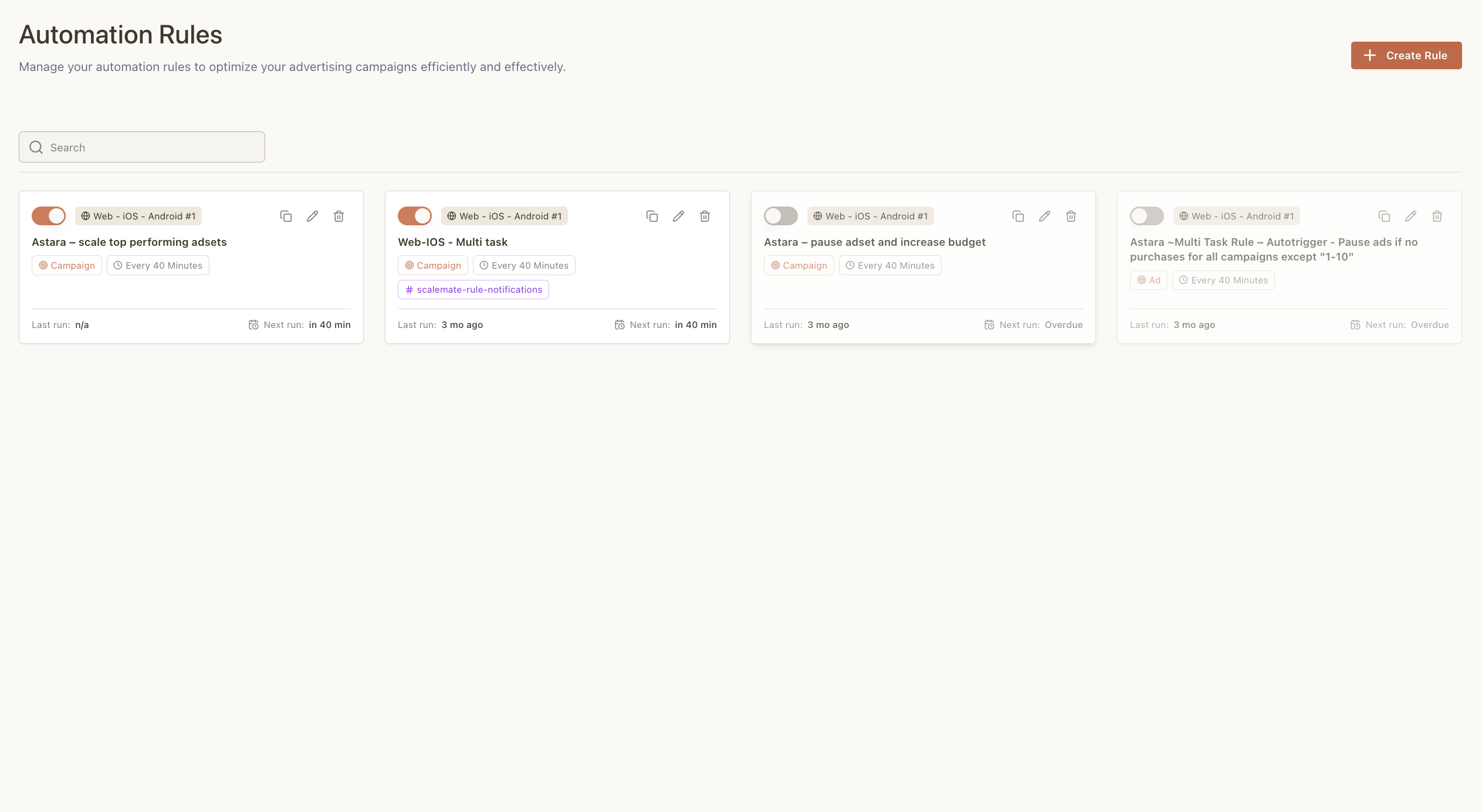
What Scalemate adds on top of native rules:
Scalemate's automation rules are built specifically for the gaps listed above. Rules run 24/7 with built-in rollback — if a budget increase causes performance to drop, the system reverses it automatically within the window you define. Multi-action logic supports conditions beyond simple AND, and rules work across Meta and TikTok from a single dashboard.
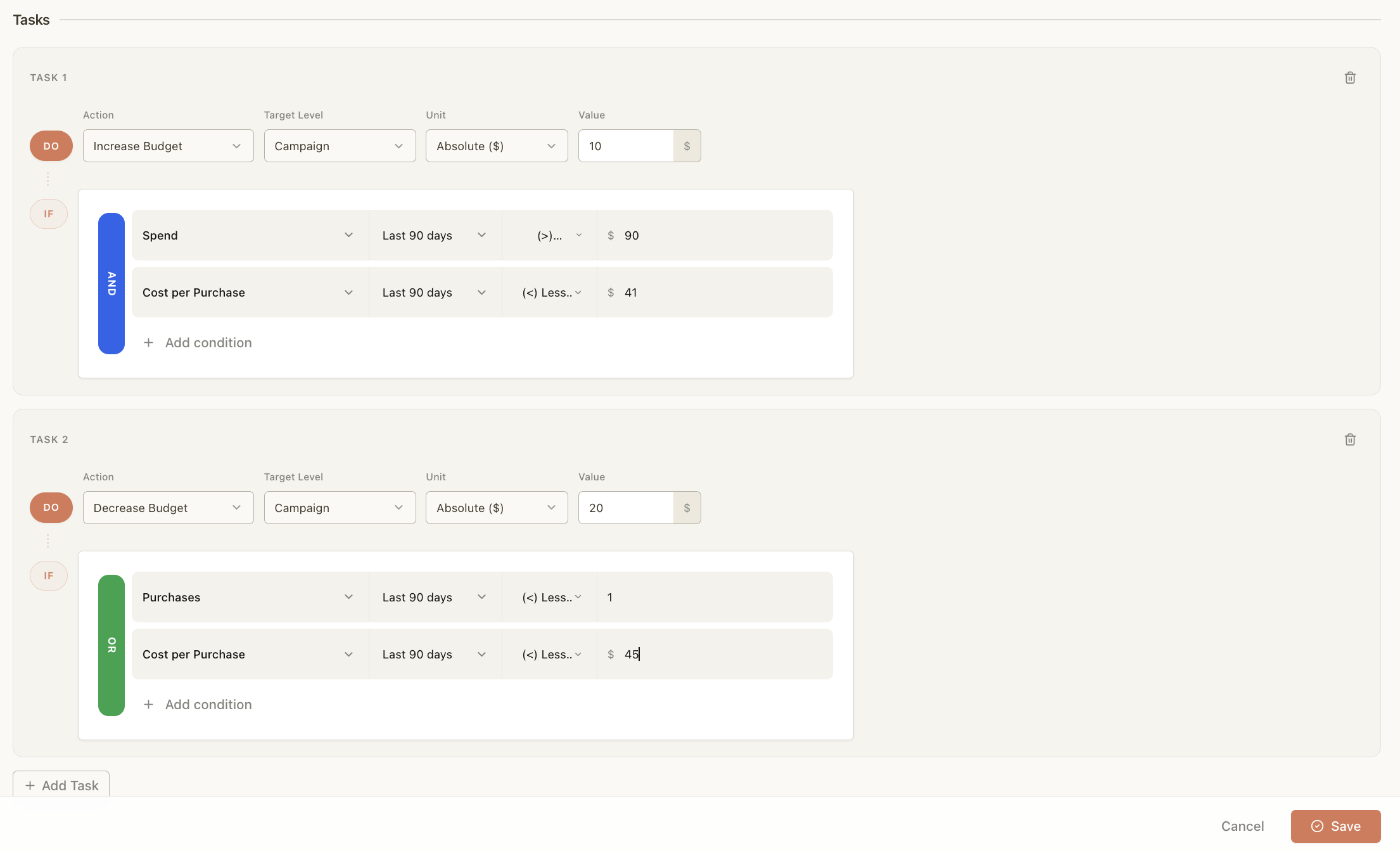
The practical results across Scalemate users show a 32% reduction in wasted budget and 62% less time spent on manual ad management. An open API supports custom workflows for teams that need deeper integration.
For a closer look at how rule-based automation compares to other platforms on the market, the Madgicx review and alternatives breakdown covers the landscape in detail. For the broader picture beyond rules — including AI-driven automation and operational tooling — see Beyond rules: full Facebook ads automation.
Teams that have outgrown native rules but want to keep the same logic-based approach can explore the ad campaign automation rules use cases page for specific workflow templates. And for a full feature breakdown, the Scalemate automation rules overview covers everything from rollback configuration to cross-platform rule management.
If the bottleneck is creative delivery rather than rules — uploading dozens of assets to Meta every week — the free bulk ad creative uploader handles Google Drive to Meta sync without downloads.